Configuring Schedules
In the Schedule tab of the New Time-Based PM Plan template Wizard, you can configure the following:
• Create the schedule template for the PM plan template that determines the frequency of work order creation and whether the schedule is recurring or non-recurring. You can create single or multiple schedules based on your requirements.
• Associate either Work Plan or Task Template as the Purpose of Visit to the PM schedule templates to generate recommended parts, service tasks, and tools on Work Orders.
 |
You cannot assign a Work Plan to one schedule template and a Task Template to another schedule template for a PM Plan Template. Each template requires only one type of Purpose of Visit to be utilized.
|
• Generate all recurrences upon creation of a PM Plan to create a complete sequence of PM Schedules in advance, rather than one per process run.
• Adjust first schedule date that can be delayed according the configured values. The first scheduled date is calculated as Start Date + Frequency. If you specify a delay, the first schedule date is set as Start Date + Delay, and the subsequent schedules will be the Last Run Date + Frequency. If the delay is not specified, the first service date will be Start Date + Frequency.
• Enable and configure Dynamic Adjustment to reschedule the future PM schedule visit on a PM Plan based on the early or delayed PM completion of the current PM Work Order. For more information, see Performing Dynamic Adjustments for PM Plans.
To configure the Schedule tab:
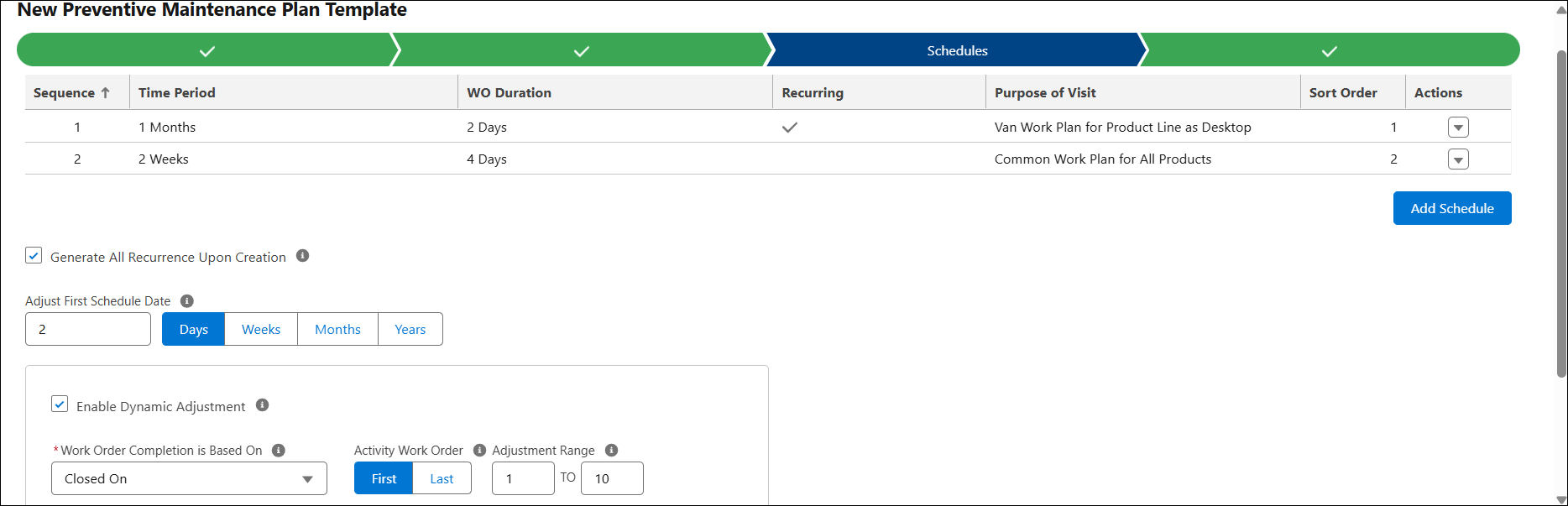
2. Configure the fields as described in the following table:
|
Field
|
Description
|
|---|---|
|
Add Schedule
|
Add a schedule template to the PM plan template that determines the frequency of work order creation and whether the schedule is recurring or non-recurring. You can create single or multiple schedules based on your requirements.
For more information, see Adding Schedule Template.
|
|
Generate All Recurrence Upon Creation
|
Select this checkbox to instruct the PM Plan Template to create a complete sequence of PM Schedules on the PM Plan in advance, rather than one per process run. For more information, see Generating Full Sequence of PM Schedule - Recurring.
|
|
Adjust First Schedule Date
|
The first PM schedule date of a PM Plan can be adjusted based on this defined field.Traditionally, the first scheduled date is calculated as Start Date + Frequency. If you specify an adjusted first schedule date using this field, then the schedule date on the first PM Schedule in the PM Plan is set as (Start Date + Delay) + Frequency, and the subsequent schedules will be the Last Run Date + Frequency. If the delay is not specified, the first PM Scheduled date will be Start Date + Frequency.
|
|
Enable Dynamic Adjustment
|
Select this checkbox to configure Dynamic Adjustment to reschedule the future PM visits of PM Plans based on the early or delayed PM completion of the current PM Work Order. For more information, see Performing Dynamic Adjustments for PM Plans.
|
|
Work Order Completion Basis
|
Dynamic Adjustment considers a PM Work Order to be complete based on the selected Work Order date or time field.
|
|
Activity Work Order
|
Select First or Last to determine whether Dynamic Adjustment performs adjustments on the first or last update to the Work Order field specified in Work Order Completion Basis. The system tracks activity behavior across multiple Work Orders when generating one Work Order per Installed Product coverage.
|
|
Adjustment Range
|
Specifies the minimum and maximum horizon for Dynamic Adjustment in PM Schedules. If a PM Work Order is completed below the minimum value, no adjustment occurs. If completed above the maximum value, the adjustment is limited to the maximum value.
|
|
Type
|
The Adjustment Type defines how Dynamic Adjustment is applied:
• Actual: Adjusts the next Scheduled On date based on the actual difference between the Work Order Completion Basis date and the Preferred Start date of the last completed Work Order.
• Fixed: Adjusts the next Scheduled On date by a fixed value specified in the Adjustment Value and Adjustment Unit fields.
|
|
Adjustment Value
|
When Adjustment Type is Fixed, this field indicates the fixed adjustment value applied by the dynamic adjustment logic.
|
|
Adjustment Unit
|
When Adjustment Type is Fixed, this field indicates the fixed adjustment unit applied by the dynamic adjustment logic.
|
Related Topics