Configuring Criteria
To configure the Criteria tab for a PM Plan Template:
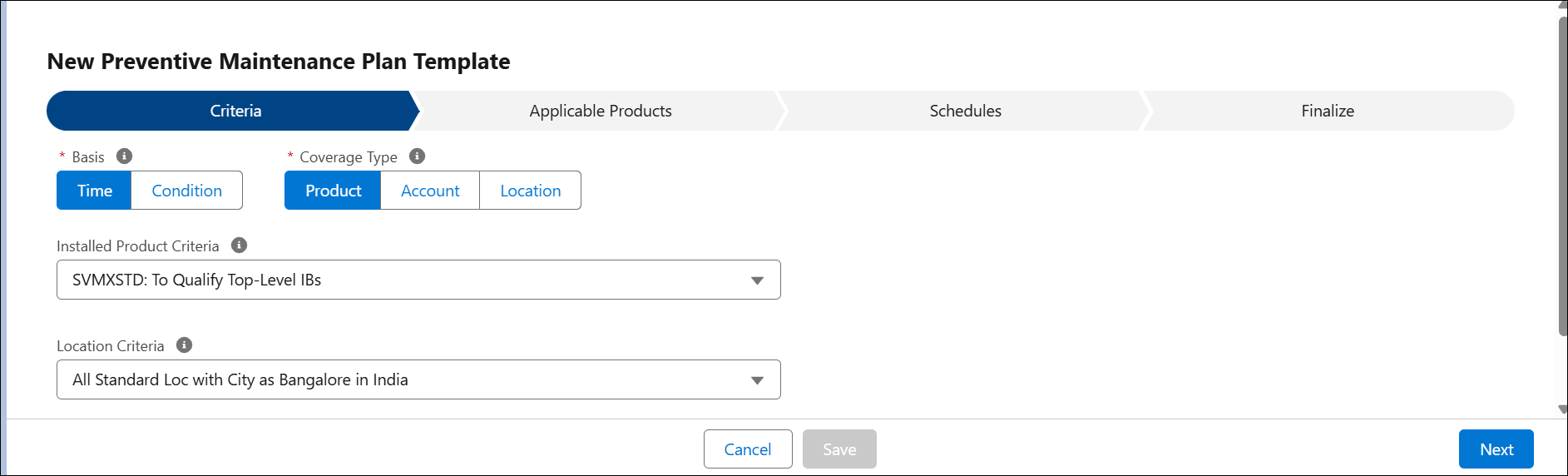
2. Enter the details for the following fields:
|
Field
|
Action
|
|---|---|
|
Basis
|
Indicates whether the PM Plan Template is a Time-Based or Condition-Based. It specifies the method used to trigger maintenance activities, either based on time intervals or specific conditions.
|
|
Coverage Type
|
This field indicates the level at which the PM Plan template is applied. Select either Account, Product, or Location level.
• Account (Visit Only): The maintenance is covered at the account level. Use this template when creating the PM Plan from Account or Service Contract objects.
• Product (Must Have IB): The maintenance is covered at IB level. If you select Product, you must have an Installed Based (IB) product. Use this template when creating the PM Plan from IB or Service Contracts if it has a covered product.
• Location (Must Have Location): The maintenance is covered at the location level. Use this template when creating the PM Plan from Locations or Service Contracts with a covered location.
|
|
Installed Product Criteria
|
This field enables you to qualify the Installed Products from which you can create PM Plans using this PM Plan template. In this field, you can use SFM expressions to filter and select the Installed Products to include.
Select the required Installed Product Criteria from the drop-down.
|
|
Location Product Criteria
|
This field enables you to qualify the locations from which you can create PM Plans using this PM Plan template. In this field, you can use SFM expressions to filter and select the locations to include.
Select the required Location Product Criteria from the drop-down.
|
3. Click Next to proceed with the Preventive Maintenance Template configuration.
Related Topics