Work Plan as a Service
Work Plans can be offered as standalone services or as services linked to an Installed Product, Product, Product Family, Product Line, or Location. Organizations can configure independent pricing and coverage for each Work Plan, providing more control over how services are monetized and billed.
Work Plan as a Service helps organizations monetize services more accurately by allowing independent pricing and entitlement of Work Plans. It reduces operational effort through automated entitlement checks and pricing, improves billing accuracy, and delivers full audit visibility across coverage and pricing decisions.
When multiple Work Plans are associated with a Service Product, each Work Plan can have separate coverage and pricing under different Warranty Terms or Service Contracts. Work Detail lines created from these Work Plans automatically inherit the correct coverage percentage and unit price during billing.
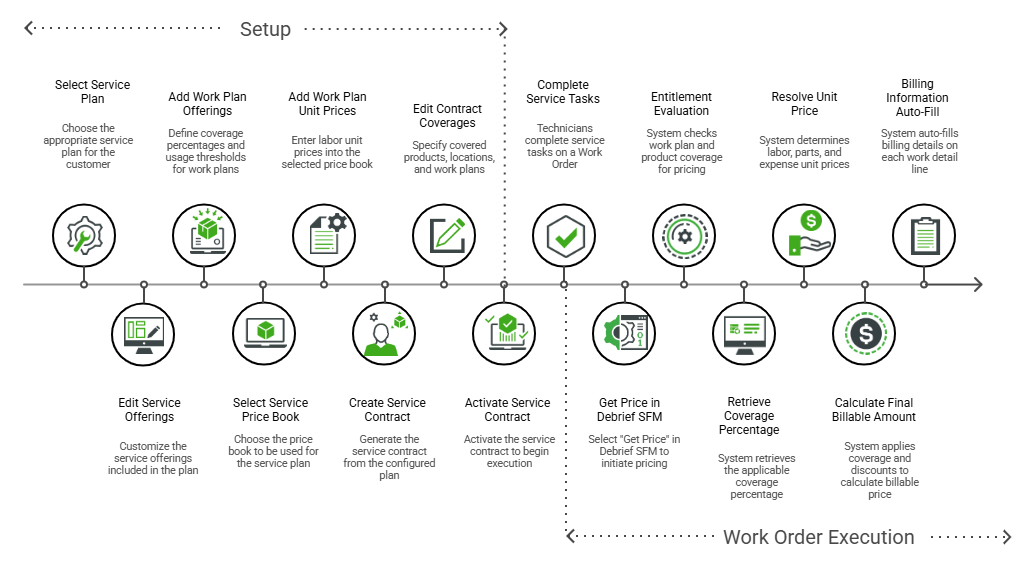
The following stages describe how Work Plans are covered, priced, entitled, and billed throughout the service lifecycle:
Service Contract and Pricing Workflow
Product Warranty and Pricing Workflow
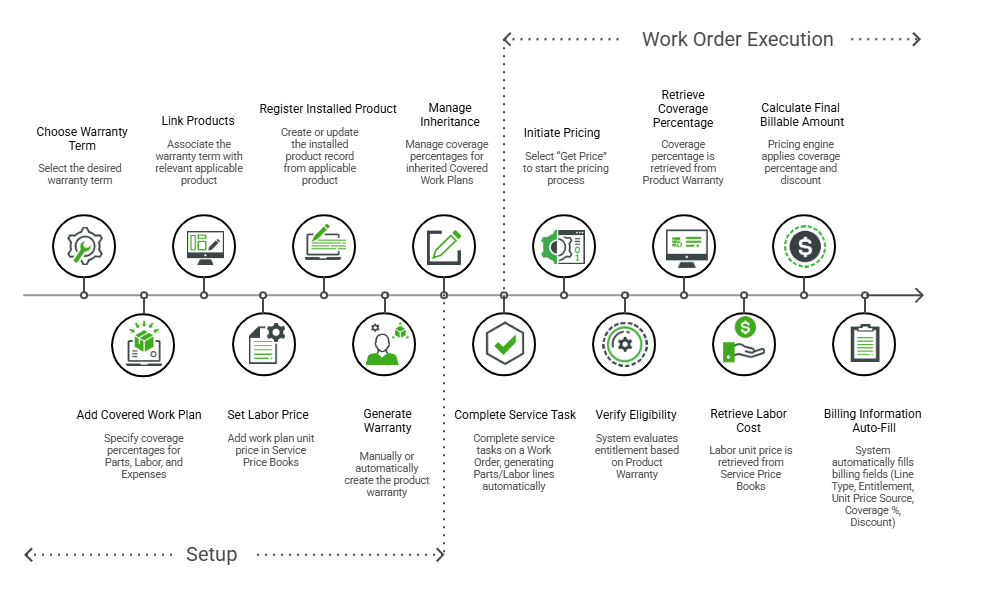
1. Define Work Plan Coverage: At the entitlement level, you can define coverage for Work Plans, and downstream records automatically inherit it. The following sections describe how coverage flows through Warranty Terms, Service Plans, and Service Contracts.
◦ On Warranty Terms: Add Work Plans as covered services on a Warranty Term and define coverage percentages for parts, labor, and expenses. For more information, see Adding Covered Work Plans to a Warranty Term.
◦ On Service Plans and Service Contracts: Add Work Plan offerings to a Service Plan as part of the service offering definition. For more information, see Adding Work Plan Offering.
2. Inherit Coverage to Products and Contracts: After you define coverage, downstream records automatically inherit it from the entitlement source.
◦ Create an Installed Product, and the system creates a Product Warranty with the same Work Plans and coverage values. For more information, see Creating Warranty on Installed Product Automatically.
◦ Create a Service Contract from a Service Plan, and the system inherits the Work Plans along with their coverage values. In the Covered Plans tab of the Coverages SFM, the inherited Work Plans can be modified as needed, including coverage percentage, thresholds, validity dates, or unlimited coverage. For more information, see Editing Covered Work Plan from a Service/Maintenance Contract.
3. Configure Work Plan Pricing: Set up pricing to ensure accurate billing for Work Plans. You can configure the following:
◦ Configure pricing in the Service Price Book using the Edit Service Price Book SFM, and define it for a Work Plan or for a Work Plan and Product combination. For more information, see Adding Labor for Work Plan.
◦ Add the Advanced Get Price snippet (Code 011) to the Debrief SFM to apply the prices automatically. For more information, see Get Price.
4. Apply Entitlement During Work Order Execution: During Work Order execution, entitlement determines which coverage applies to the Work Plan and from which source it is derived.
◦ Assign coverage automatically using entitlement rules or manually update it in the Interactive Entitlement Screen. For more information, see Assigning or Reassigning Entitlement Coverage.
◦ If a Work Plan is not covered, the system evaluates coverage at the Service Product level.
5. Calculate Final Billable Amount: The system applies coverage and pricing to Work Detail lines and records billing details when you run Get Price.
◦ Complete a service task to create a Labor Work Detail, and consume parts to create a Part Work Detail.
◦ Run Get Price to apply entitlement-based coverage and retrieve unit pricing from the Service Price Book or from Service Contract Special Pricing. The system automatically applies coverage for parts and expenses from the Covered Work Plan. If the Work Plan linked to a Work Detail is not entitled or not covered, the system evaluates entitlement at the Service Product level and applies the corresponding pricing. For more information, see Get Price and Work Plan as Service Pricing Guide.
◦ Review the Billing Information field on the Work Detail to view the price source, coverage source, discounts, and final billable price. For more information, see Initiating Price Calculation.
Related Topics