Adding Covered Work Plans to a Warranty Term
You can link Work Plans to Warranty Terms to define which service type is covered and how unit price are applied during service delivery. Each Work Plan represents a unit of work from the Work Plan Library. When Work Plans are associated with a Warranty Term, you can set Parts, Labor, and Expense coverage for each Work Plan. When a Product Warranty is created for an Installed Base (IB), the system automatically creates the corresponding Covered Work Plans. During entitlement, Work Plans inherit the defined coverage values, and the pricing engine uses these values to calculate billable amounts consistently and accurately.
To add Covered Work Plans to a Warranty Term:
1. Go to ServiceMax Setup > Warranties & Contracts > Warranty Terms.
The Warranty Terms page is displayed.
 |
You can also select the App Launcher, type Warranty Terms in the search bar, and select it from the results.
|
2. Click the Warranty Term record for which you want to add a covered work plan.
3. Select the Related tab, go to the Covered Work Plans and click New.
The New Covered Work Plan pop-up window is displayed.
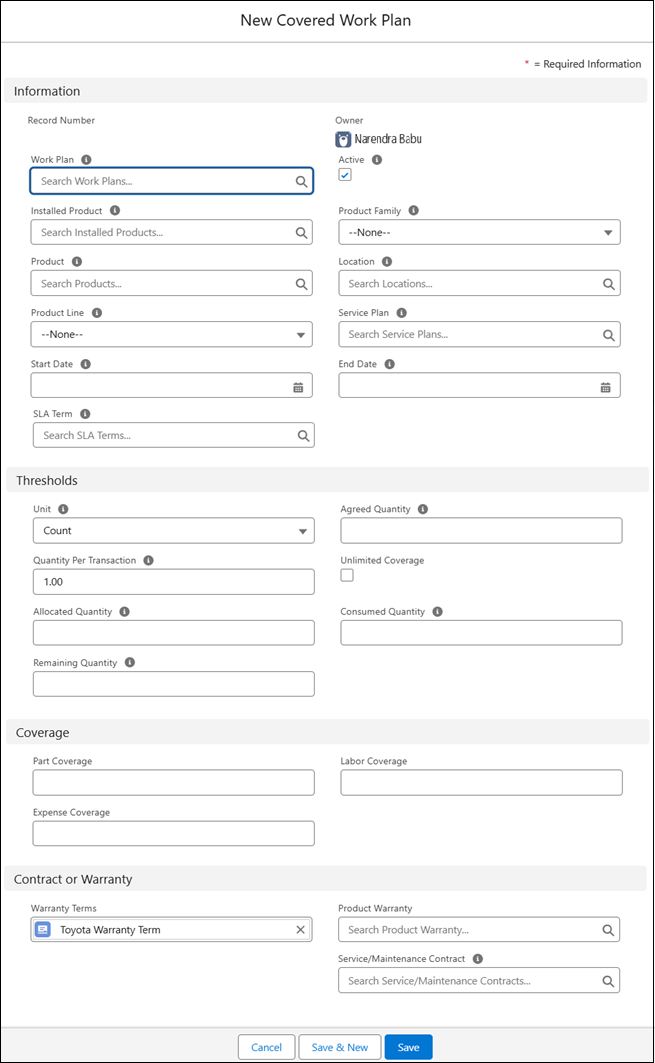
4. Provide the details for the fields as described in the following table to add work plans to the Warranty Term:
|
Field
|
Description
|
|---|---|
|
Information
|
|
|
Work Plan
|
Displays the work plan to associate with the warranty term. Search and select the Work Plan you want to add to the warranty term.
You can also create a new work plan by clicking New Work Plan. For more information, see Creating New Work Plan.
|
|
Coverage
|
|
|
Part Coverage
|
Specifies the percentage of part costs covered under the work plan. Enter the applicable percentage.
|
|
Labor Coverage
|
Defines the percentage of labor costs covered under the work plan. Enter the applicable percentage.
|
|
Expense Coverage
|
Specifies the percentage of expense costs covered under the work plan. Enter the applicable percentage.
|
|
Contract or Warranty
|
|
|
Warranty Terms
|
This field displays the Warranty Term associated with the Covered Work Plan. The warranty term is automatically populated when you add covered work plan to the Warranty Term.
|
5. To save the changes, click Save.
After adding covered work plans to a Warranty Term, make sure to define unit price for the work plans in the Service Pricebook. For more information, see Adding Labor for Work Plan.