Configuring Rules to Apply Specific Work Plan
You can configure work plan auto-assignment rules to assign specific Work Plans for Work Orders or Service Products.
In the rule, you can add specific Work Plans that must be applied to Work Orders or Service Products that qualify the criteria.
To configure rules to auto-assign specific Work Plan:
1. In the Auto-Assignment Rule page for Work Orders or Service Products, select Apply Specific Work Plan.
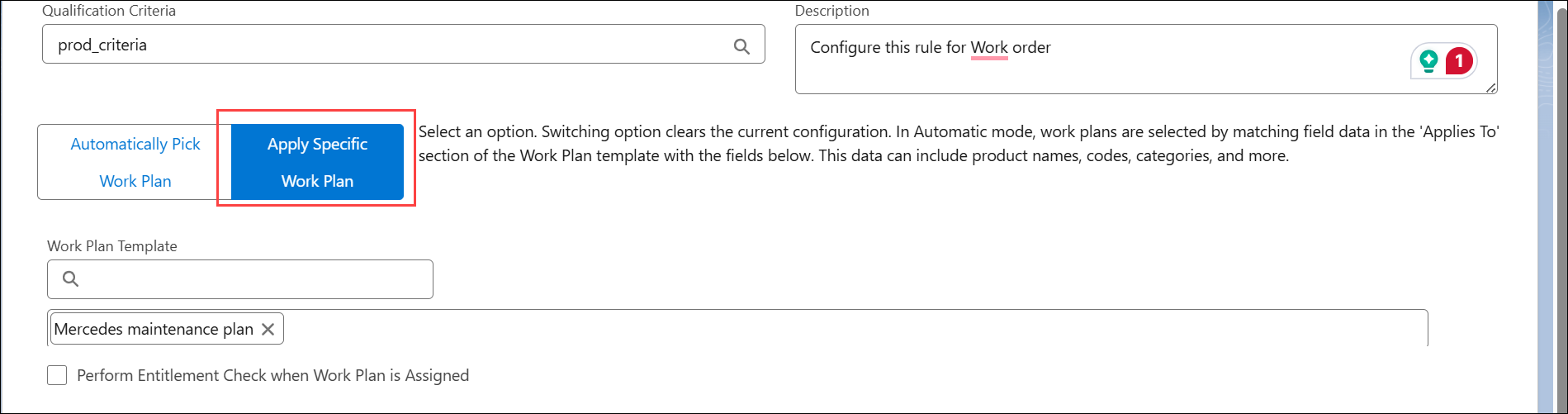
2. In the Work Plan Template, click the Search bar.
The Select Work Plan(s) pop-up window is displayed.
3. Select the Work Plans you want to assign and click Apply.
4. Click Save.
For example, you want technician to complete the site inspection before starting service activity on any installed product in the field.
In the rule:
• Add qualification criteria to identify the Work Order of type Field Service.
• In the Work Plan template, select the Site Inspection Work Plan. For more information, see Creating a Work Plan.