Using AI Actions
You can use the AI Actions configured for you in Go to carry out specific tasks. The AI Actions help you perform pre-set actions on the record. For example, you can use the Summarize Work Order AI action to obtain a summary of the work order.
Prerequisites
You can use AI Actions in Go only if the following prerequisites are met:
• The AI Action Wizard and Wizard Steps are configured in the org and assigned to your user profile.
• The AI Action is configured suitably in the AI Console. The actions to perform when the AI Action is invoked are defined in the AI Action configuration.
Using AI Actions on Go
To use an AI Action on Go:
1. Launch the record for which you want to use the AI Action.
2. Navigate to the Actions tab.
Available AI Actions for the records are listed in the Actions section.
3. Tap the AI Action you want to invoke.
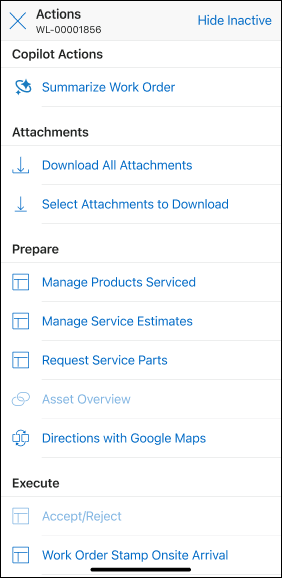
The configured actions for the AI Action are performed. For example, if you invoke Summarize Work Order AI Action, a summary of the work order is displayed.