Defining General Properties
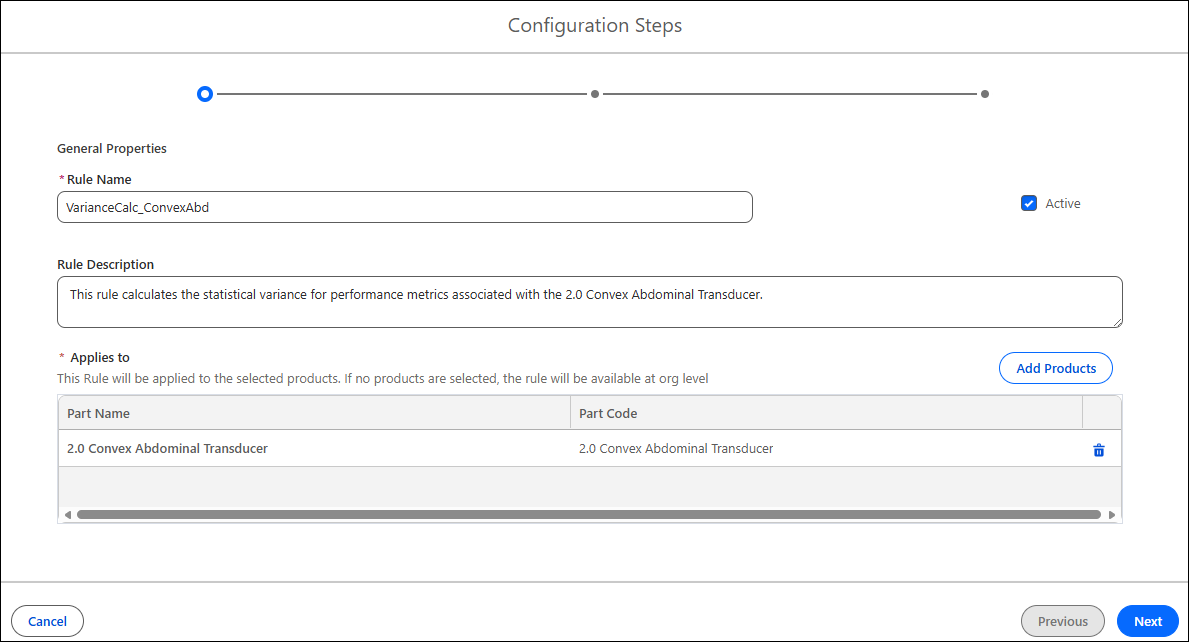
The General Properties allows you to define the basic properties of the variance rule, such as name, description, and applicable products.
To define the general properties for the rule:
1. Provide the details for the fields as explained in the following table:
|
Field
|
Description
|
||
|---|---|---|---|
|
Fields marked with * are mandatory.
|
|||
|
Rule Name*
|
Enter a unique name for the variance rule. This name helps administrators and users easily identify the rule within the variance rule list.
|
||
|
Active
|
Select this checkbox to activate the rule. When checked, the rule is included in variance calculations and reporting; when unchecked, the rule remains inactive and does not affect variance scoring. This setting allows you to control which rules are currently enforced without deleting them.
|
||
|
Rule Description
|
Provide a brief summary or explanation of the rule’s purpose, scope, or any relevant details. This optional field helps clarify the intent and context of the rule for future reference.
|
||
|
Applies To
|
Displays the list of products (parts) to which this rule applies. Each product listed here follows the configuration settings defined in this rule.
|
||
|
Add Products
|
This is a product selection window. From here, you can select one or more products to associate with the rule. Each product can only be linked to one active rule at a time.
|
||

2. Click Next.
Related Topics
Reference Topics