Adding Zone Pricing
You can define zone-based travel pricing for a service contract by defining zone pricing in a service plan, assigning specific travel rates to different geographic zones. Zone pricing allows you to configure travel costs based on service regions or coverage areas. You can add new zone pricing records or clone existing ones in a service plan to simplify setup and maintain consistency across service contracts.
To add zone pricing:
1. Go to ServiceMax Setup > Warranties & Service Contracts > Service Plans.
The Service Plans page is displayed. By default, the Service Plans page displays only recently viewed service plans.
 |
Alternatively, you can access the Service Plans page by clicking the App Launcher, type Service Plans in the search bar, and select it from the results.
|
2. To view all service plans, click All Service Plans from the list view dropdown.
3. In the Service Plan Name column, select the required service plan name.
The selected Service Plan record page is displayed.
4. In the Edit Service Plan Travel Policy wizard, under the Lines section, select the Zone Pricing tab.
5. Click Add Zone Pricing.
A new row is created in the Zone Pricing tab.
6. Provide the details for the fields as described in the following table.
|
Field
|
Description
|
|---|---|
|
Zone
|
Displays the name of the zone used for travel pricing. Select the required zone from dropdown.
|
|
Rate
|
Displays the travel rate applied for the zone. Enter the rate value (flat rate or per mile) according to your pricing policy.
|
|
Currency ISO Code
|
Displays the currency used for the zone rate (for example, Australian Dollar, U.S. Dollar). Select the correct currency code from the list.
|
|
|
You can clone a row in Zone Pricing tab. Select the down arrow icon next to an existing zone pricing record, and then select Clone. A new row is created, and you can modify the details as needed.
|
7. To save the changes and to stay on the Zone Pricing page, click Quick Save.
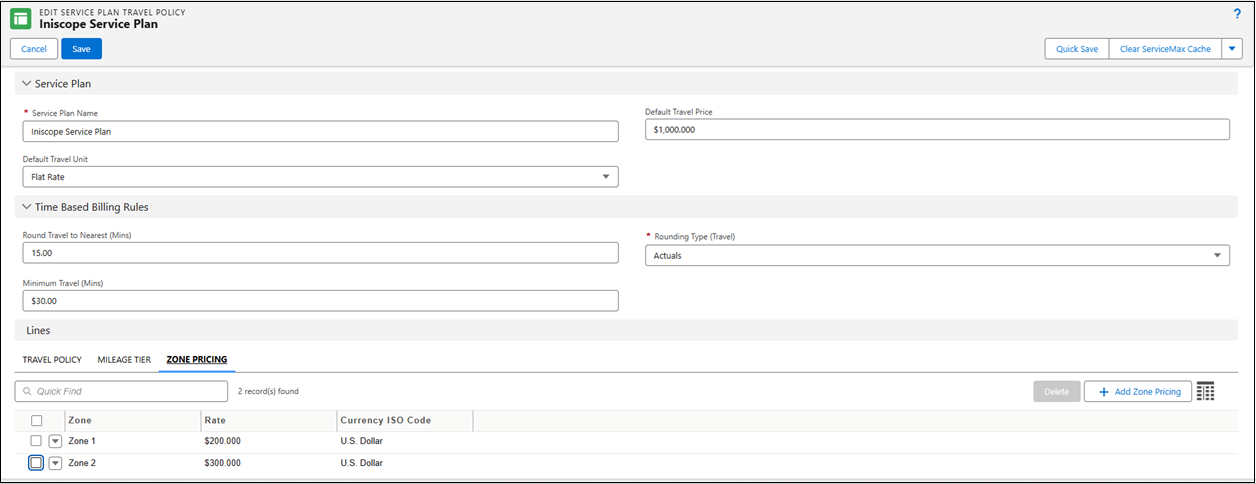
8. To save the changes and navigate back to the Details tab, click Save.
In the Related tab of the Service Plan record page, under Zone Pricing related list, you can view all Zone Pricing records for the selected service plan.