Adding a Lookup Attribute
In a Technical Attribute Template, a Lookup Attribute allows users to select a value from the referenced object.
 |
The Lookup attribute type is supported only when configuring technical attribute templates in Lightning mode and is not supported in Sencha mode.
|
To add a lookup attribute:
1. In a Technical Attribute template, go to a Section and click Add New Attribute. For more information, see Adding a Section.
The New Attribute pop-up window is displayed.
2. Provide the details for the fields as described in the following table:
|
Attribute
|
Description
|
||
|---|---|---|---|
|
Attribute Name
|
Enter the name of the attribute.
|
||
|
Attribute Description
|
Enter a description for the attribute.
|
||
|
Unit
|
Enter the unit for the attribute. To support a wide variety of possible units and metric systems, it defined as a textbox instead of a drop-down list.
Indicates the measurement unit associated with the attribute.
|
||
|
Mandatory
|
Select this checkbox to make the attribute mandatory. This ensures critical data is captured for an Installed Product.
|
||
|
Data Type
|
Select Lookup data type from the drop-down list. Fields related to the Lookup data type appear.
|
||
|
Select Object
|
Search for and select the object you want to reference in this attribute. For example, a custom object that holds the list of software versions for various products.
|
||
|
Select Field to Display
|
Select the field from the drop-down. The fields available in the drop-down are derived from the selected object. Based on the chosen field, its corresponding values will be displayed for end users to select when recording this attribute. The selected field value is stored as attribute’s value.
|
||
|
Select Expression
|
Select the expression criteria from the drop-down to filter the records that must be displayed for user selection. For example, if Software version is the custom object selected, then add an expression to list software version that are specific to Product Family or Product Name.
|
||
|
Default Value
|
Select the default value from the drop-down. By default, this value is displayed when users record this attribute. This is optional.
|
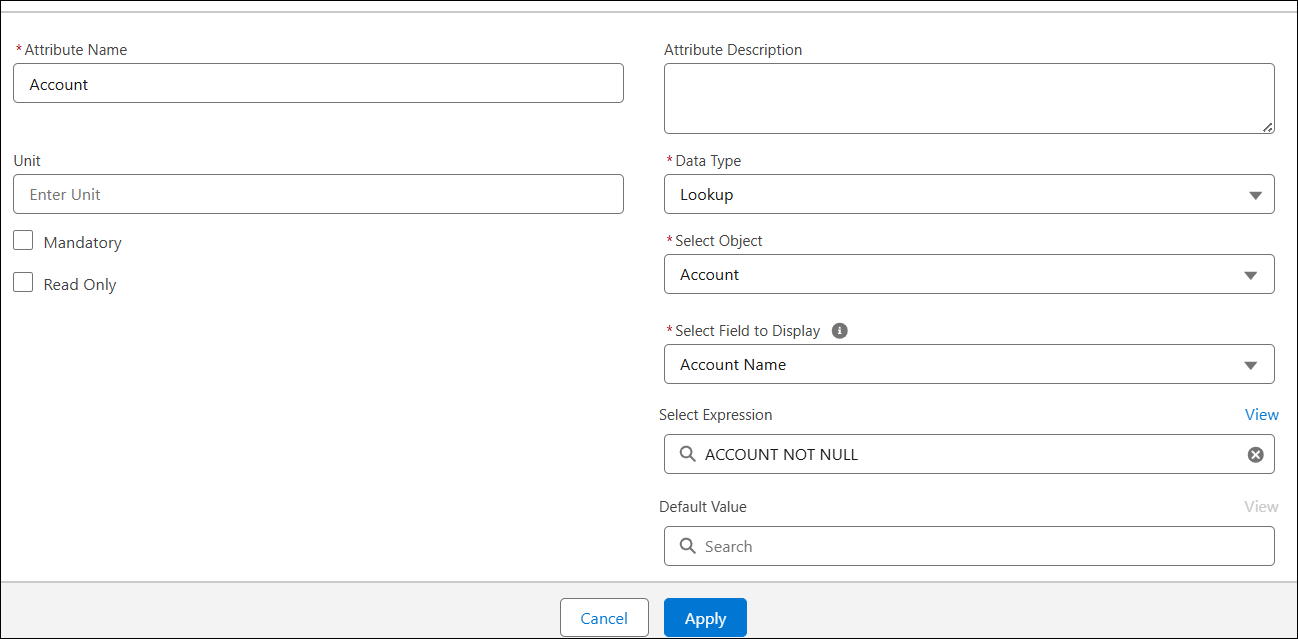
3. Click Apply.
4. Similarly, add additional attributes and click Save.
The Technical Attribute Template is saved with the attributes.
You can record value for all attributes from installed product record or record that has reference to Installed Product using Technical Attribute interface.