Configuring Labor Lines Creation
You can configure labor lines creation for your organization that enables system to automatically generate labor lines for service tasks upon completion of a service task or work plan. This eliminates manual data entry work for service engineers at the end of the day. As a result, closing work orders in the field becomes easier and invoicing customers is faster. For more information, see Labor Lines Generation.
The Labor Lines are the Work Detail Lines of the Line Type, Labor, which include information about the service tasks and time consumed by technicians to complete those tasks.
You can configure the creation of labor lines either upon service task completion or work plan completion. Additionally, you can set up custom mappings to map fields from service tasks, work orders, or work detail lines to the labor lines upon creation. By default, certain fields from service tasks are mapped to labor lines as part of the package. This enables you to capture the required information in the labor lines upon creation.
To configure labor lines creation:
1. From the Home page, navigate to ServiceMax Setup > Work Plan Management > Creation of Labor Lines.
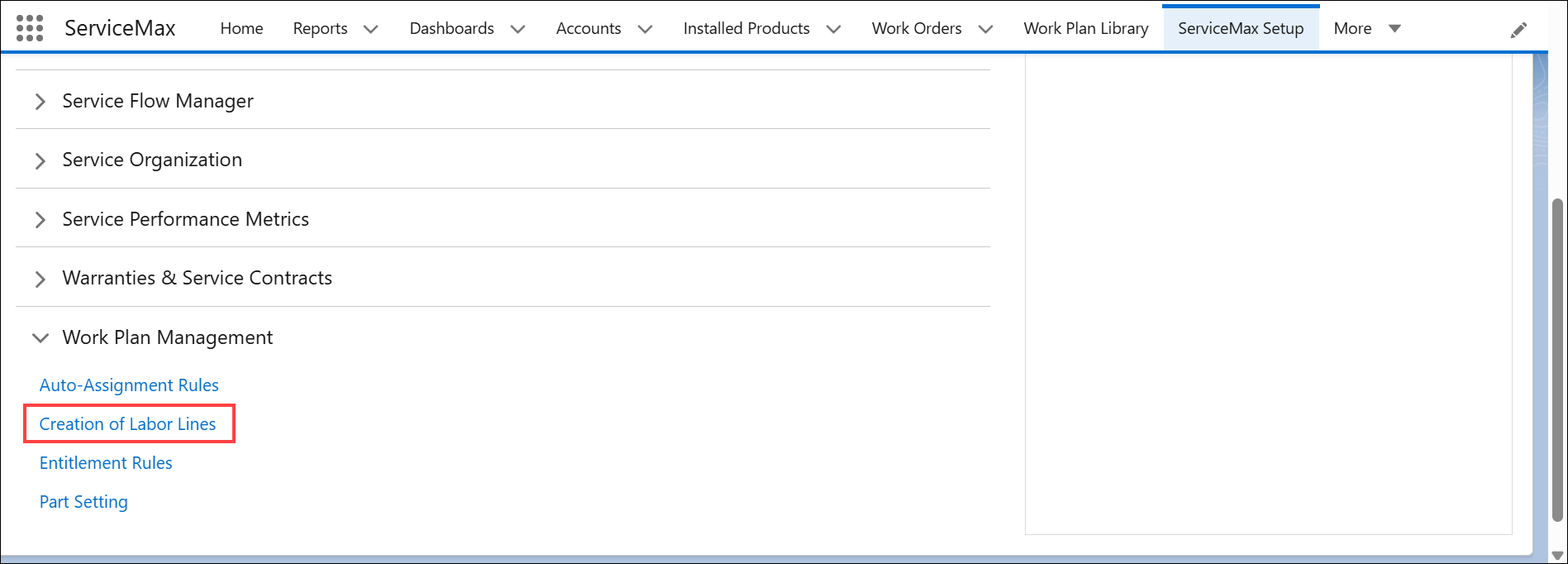
The Creation of Labor Lines page is displayed.
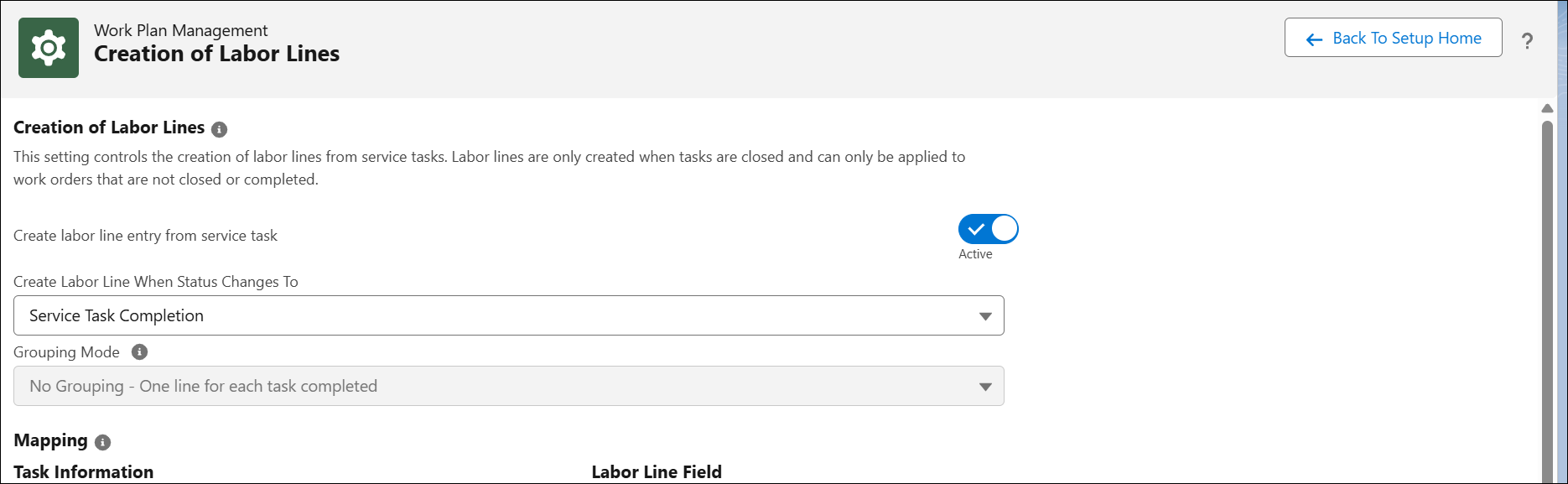
2. Configure the fields as described in the following table:
|
Field
|
Description
|
||
|---|---|---|---|
|
Create labor line entry from service task
|
Ensure that this option is enabled. The labor lines can only be created if this option is enabled.
|
||
|
Create Labor Line When Status Changes To
|
This field allows you to decide when labor lines must be generated from a completed service task.
Select any of the following:
• Work Plan Completion: Creates labor lines for service tasks when the status of a work plan associated with the Work Order is marked as complete. For more information, see Labor Lines Generation for each Service Tasks upon Work Plan Completion.
• Service Task Completion: Creates labor lines for service tasks when the status of service tasks associated with the Work Order is marked as complete. For more information, see Labor Lines Generation upon Service Tasks Completion.
For example, if multiple engineers are assigned to a work order and each is responsible for one or more service tasks, you can select the Work Plan Completion option to generate labor lines only after all tasks in the work plan are completed.
|
||
|
Grouping Mode
|
In the Grouping Mode, select one of the following options:
• No Grouping - One line for each task completed: Creates labor lines for each service tasks upon completion.
• Group - One line for each assignee: Creates labor lines for each user assigned to execute the work plan. When multiple service tasks within a work plan are assigned to the same user, they are grouped together, and a single labor line is generated to represent the total effort. For example, when the technician, John, completes all the service tasks assigned to him, a single labor line is created that represents the total duration of all his tasks. For more information, see Labor Lines Generation for Group Service Tasks per Assignee upon Work Plan Completion.
|
3. In the Mapping section, check the fields that are mapped from the Service Task record to the Work Detail record at the time of labor line creation. By default, some fields are auto-mapped as part of the package and are not editable.
Under the Task Information, you can find fields from the Service Tasks, Work Order, and Work Detail objects. Values from these fields are mapped to the respective field in the Labor Line Field section.
Under the Labor Line field, you can find fields from the Work Detail object.
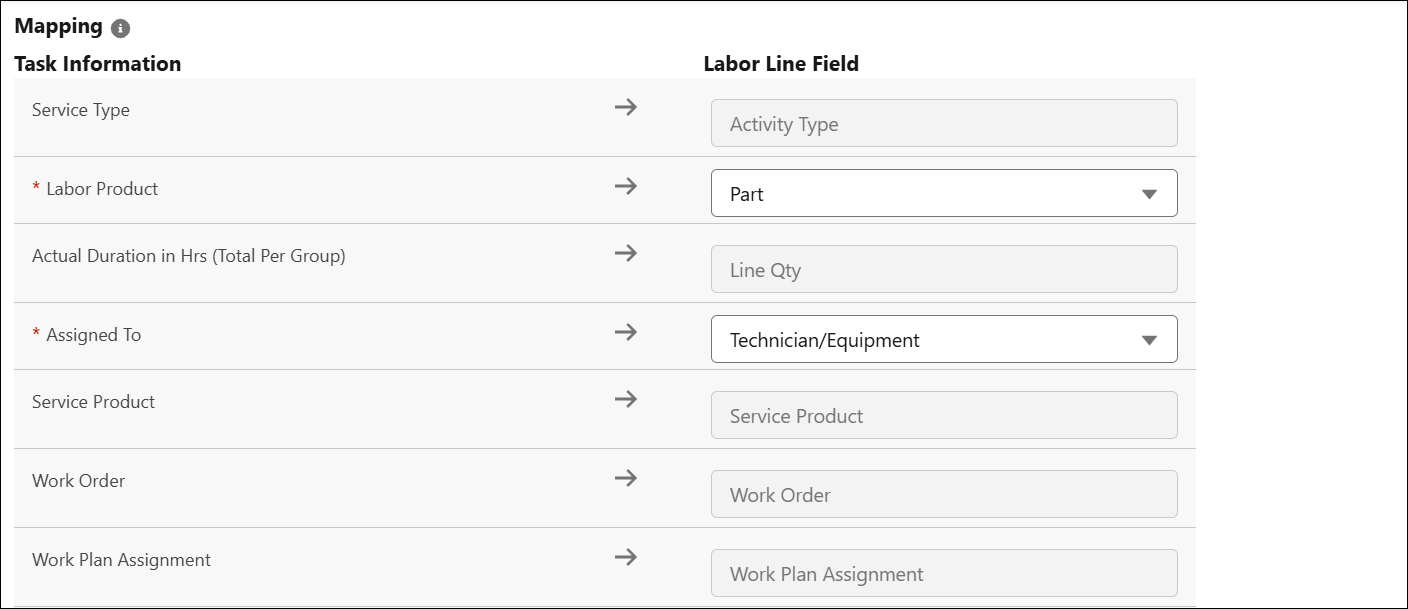
4. In the Custom Mappings, configure additional mappings to map fields from source objects such as Service Task or Work Order to the Work Detail, or to set specific values for Work Detail fields during labor line creation. For more information, see Configuring Custom Mappings.
Based on the configuration, the labor lines are created for service tasks that have the Create labor line on work order when status is changed to complete option enabled.
Configuring Custom Mappings
You can configure custom mappings to map fields from source objects such as Work Order, Sevice Task, or Work Detail Lines to the labor lines upon creation.
To configure a custom mapping:
1. In the Creation of Labor Lines page, go to the Custom Mappings section.
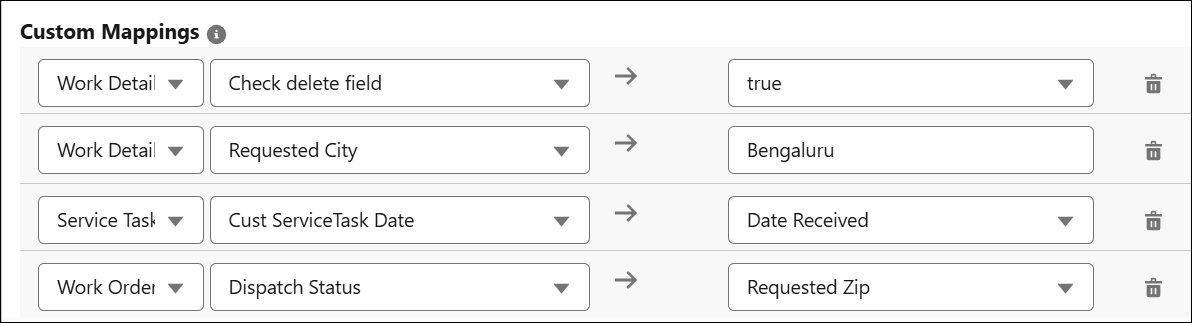
2. Select the source object. The source object can be Work Order, Service Product, or Work Detail.
3. Select the field you want to map to the labor line. The fields are displayed based on the source object selected.
For example, Due Date for the Service Task Object.
4. Under the Labor Line Field, select a field to be mapped to the field of the source object. These fields are listed based on the data type of the source object’s field.
 |
The Work Detail object supports only value mapping, where you can either select or manually enter a value.
|
For example, the Start Date field on the Service Task is mapped to the Start Date Time field on the Work Detail.
|
|
• The picklist or multi-picklist field of the source object can also be mapped to text or text area fields of the target object.
• For the Work Detail object, field-to-field mapping cannot be configured. Instead, you can define a field value of Work Detail to map it to the labor line.
|