Viewing AI Credit Consumption
Monitor and analyze end-user AI credit consumption across platforms such as Asset Service History, Knowledge Access, and DataGuide.
To view AI credit consumption, perform the following steps.
1. Go to > > .
The ServiceMax AI Console is launched.
2. On the sidebar, select > > .
The ServiceMax AI Analytics page displays with a table showing credit usage data.
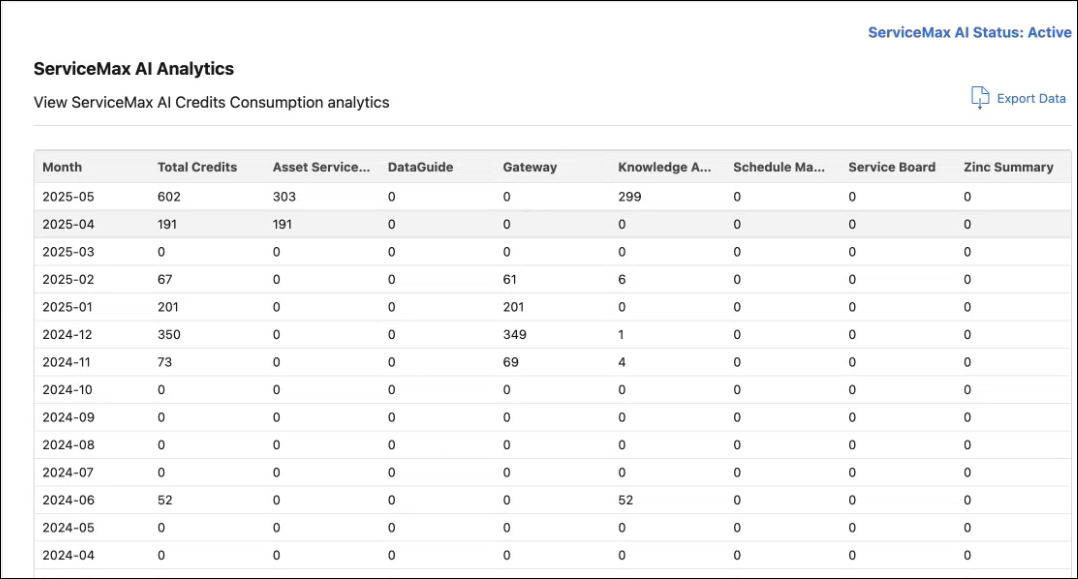
The AI Credits Consumption table includes the following fields:
|
Field
|
Description
|
|---|---|
|
Month
|
Calendar month during which AI credits were consumed.
|
|
Total Credits
|
Total number of AI credits used in the month.
|
|
Asset Service
|
Credits consumed by AI services related to asset management.
|
|
DataGuide, Gateway, Knowledge Access, Schedule Management, Service Board, Zinc Summary.
|
Credit usage for each specific service.
|
|
Export Data
|
Button to download credit consumption data as a CSV file for offline analysis.
|