Starting a Follow-Up Chat from an AI Action
Start a follow-up conversation from an AI action response to ask additional questions without opening a new chat. The AI chat retains the original record details, such as the Work Order ID, so the AI understands your references and maintains the current record information. This keeps the conversation relevant and seamless, without requiring you to re-enter information.
Use Cases
The following list represents some of the use cases for Follow up Chat feature:
• View the parts used in a specific work order.
• Identify the technician assigned to a job.
• Access customer feedback related to the service.
To use follow up chat, perform the following steps.
1. Open an AI action response and scroll to the bottom.
A Follow up with ServiceMax AI button is displayed.
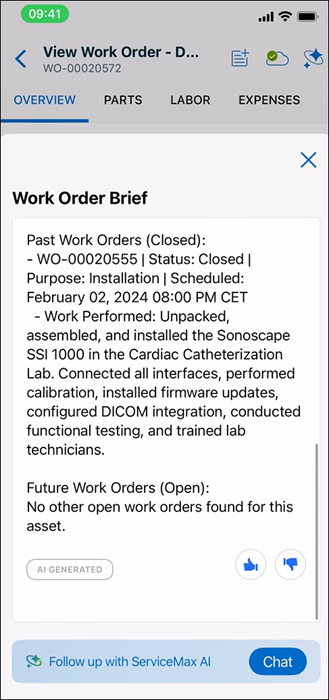
2. Tap the Follow up chat with ServiceMax AI Chat button.
The follow-up chat session opens with the same navigation context, such as the Work Order ID.
 |
The follow-up chat button appears only if the AI action returns a response.
|