Entitlement Settings for Work Order
Entitlement Settings for Work Order at the Product level
1. Navigate to > > .
2. Follow the steps to create a new rule. For more information, see Creating Auto-Entitlement Work Order Rules.
3. In the Choose Entitlement Settings section select Product.
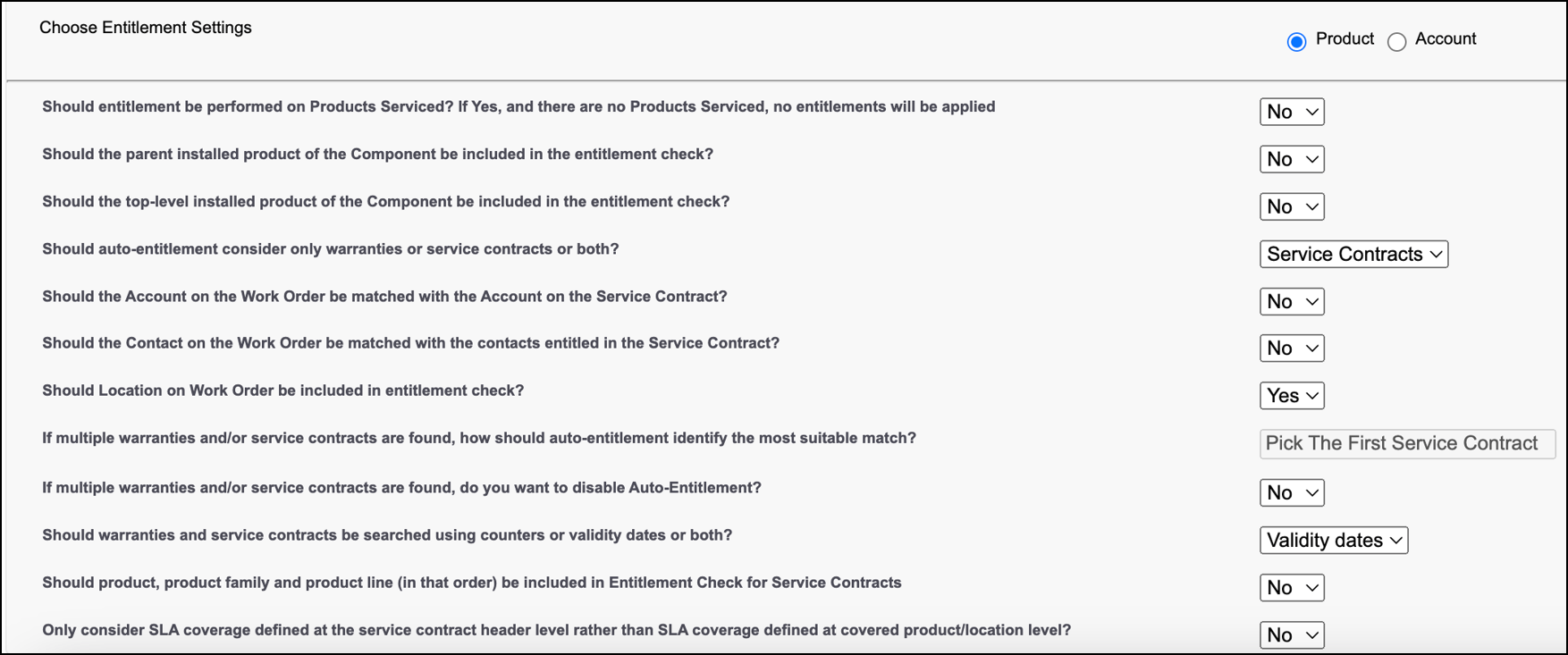
The following table describes the Entitlement Settings for Work Order when the Product level is selected.
|
Entitlement Settings
|
Option
|
Description
|
||
|---|---|---|---|---|
|
Should auto-entitlement consider only warranties or service contracts or both?
|
Warranties
|
This option enables the auto-entitlement engine to consider Warranties.
|
||
|
Service Contracts
|
This option enables the auto-entitlement engine to consider Service Contracts. Once you choose this option the following rules are enabled:
• Should the Account on the Work Order be matched with the Account on the Service Contract?
• Should the Contact on the Work Order be matched with the contacts entitled in the Service Contract?
• Should Location on Work Order be included in entitlement check?
• If multiple warranties and/or service contracts are found, do you want to disable Auto-Entitlement?
• Should product, product family and product line (in that order) be included in Entitlement Check for Service Contracts
• Only consider SLA coverage defined at the service contract header level rather than SLA coverage defined at covered product/location level?
|
|||
|
Both
|
This option enables the auto-entitlement engine to cover Service Contracts and Warranties. Once you choose this option the following rules are enabled:
• Should the Account on the Work Order be matched with the Account on the Service Contract?
• Should the Contact on the Work Order be matched with the contacts entitled in the Service Contract?
• Should Location on Work Order be included in entitlement check?
• If multiple warranties and/or service contracts are found, do you want to disable Auto-Entitlement?
• Should product, product family and product line (in that order) be included in Entitlement Check for Service Contracts
• Only consider SLA coverage defined at the service contract header level rather than SLA coverage defined at covered product/location level?
|
|||
|
Should warranties and service contracts be searched using counters or validity dates or both?
|
Validity dates
|
This option enables the auto-entitlement engine to search for Warranties and Service Contracts using Validity dates. Once you choose this option the following rule is enabled:
• Should product, product family and product line (in that order) be included in Entitlement Check for Service Contracts
|
||
|
Counters
|
This option enables the auto-entitlement engine to search for Warranties and Service Contracts using Counters.
|
|||
|
Both
|
This option enables the auto-entitlement engine to search for Warranties and Service Contracts using Validity dates and Counters. Once you choose this option the following rule is enabled:
• If you selected Both for the above question, select your preference for processing counters and validity dates.
|
|||
|
Should product, product family and product line (in that order) be included in Entitlement Check for Service Contracts
|
Yes
|
This option enables the auto-entitlement engine to check coverage on the Product, Product Family and Product Line (in the mentioned order) when the Covered Product (Installed Product) has no coverage. This applies to the Work Order and the Product Serviced lines.
When you select this option the order of entitlement is as follows:
1. Installed Base: Product, Product Family, Product Line
2. Parent: Product, Product Family, Product Line (If the entitlement setting Should the parent installed product of the Component be included in the entitlement check? is selected as Yes)
3. Top level: Product, Product Family, Product Line (If the entitlement setting Should the top-level installed product of the Component be included in the entitlement check? is selected as Yes)
|
||
|
No
|
When you select this option the entitlement check will not happen on Product, Product Family and Product Line. The order of entitlement is as follows:
1. Installed Base
2. Parent (If the entitlement setting Should the parent installed product of the Component be included in the entitlement check? is selected as Yes
3. Top level (If the entitlement setting Should the top-level installed product of the Component be included in the entitlement check? is selected as Yes)
|
