Configuring Initial Sync for Multi-Assign Events
After you enable Multi-Assign Events, additional configuration is needed to prevent initial sync of child Events from Salesforce to Service Board.
To configure initial sync for Multi-Assign Events:
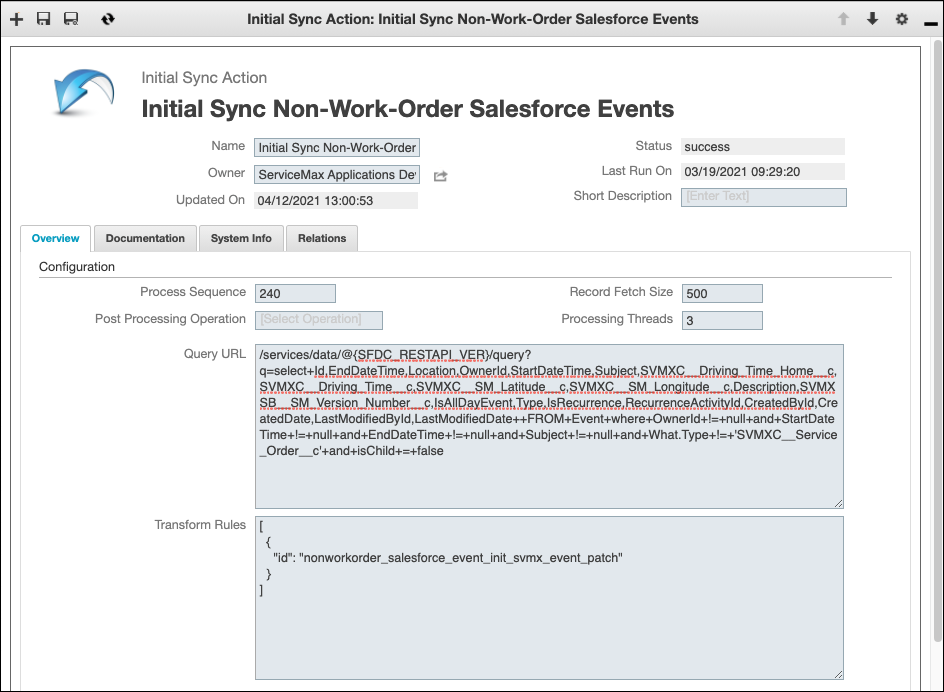
1. In Max Designer, on the Developer Tools ( ) launchpad menu, click Initial Sync Actions, and then in the list view, click Initial Sync Non-Work-Order Salesforce Events.
) launchpad menu, click Initial Sync Actions, and then in the list view, click Initial Sync Non-Work-Order Salesforce Events.2. On the record page, in the Query URL field, append +and+isChild+=+false to the filtering code, and then in the top left corner, click Save and Close ( ).
).
).
For more information: