Calculating Hierarchy
In Product Structures, the SBOM relies on hierarchical level data to accurately represent parent–child relationships between components. However, in certain scenarios—such as data migrations, legacy imports, or incomplete updates, some SBOM records may be missing hierarchy information. When hierarchy data is absent, the Product Structure cannot be displayed fully, leading to confusion and blocking downstream tasks such as part analysis, visibility, or configuration validation.
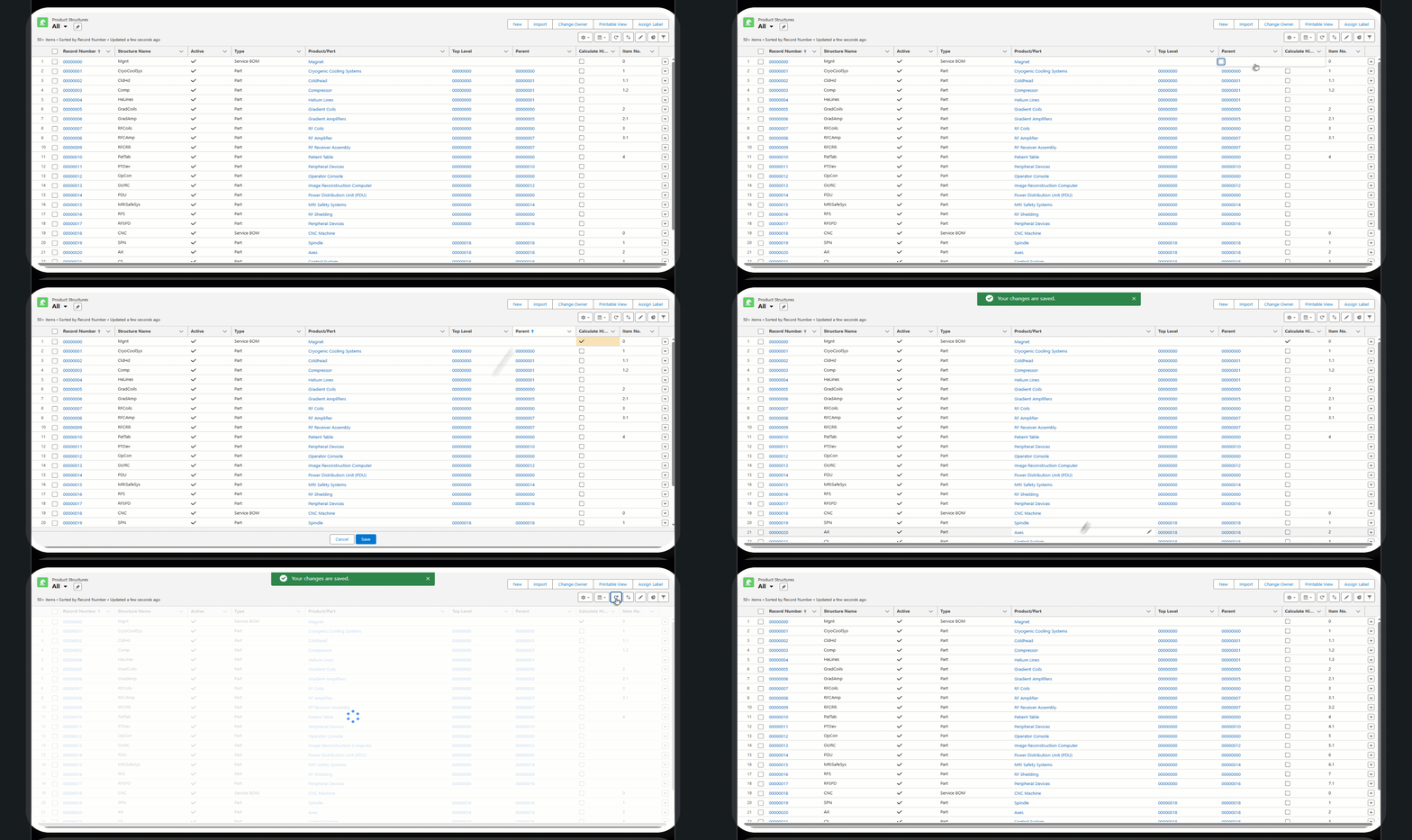
The Calculate Hierarchy feature automatically generates the missing hierarchical levels for an SBOM. Once the calculation is executed and the page is refreshed, the full product structure becomes visible with correct hierarchy levels.
This enables administrators and technicians to recover the broken or incomplete SBOM trees without manual intervention.
To calculate the hierarchy:
|
Prerequisites
|
|---|
|
• Ensure that the Top-Level and the Parent fields are defined in the Product Structure.
• Some or all of Item No. fields must be empty for the respective SBOM.
|
1. Navigate to the Product Structure tab.
2. In All Product Structures view, navigate to Service BOM type record.
3. In the Calculate Hierarchy field, click Edit in the action menu.
4. Select the checkbox.
5. Click Save.
6. Click Refresh.
The missing hierarchy levels are updated. The following GIF illustrates the process of calculating the hierarchy.