AI Configurations
The following screen is a sample validation message for AI configurations:
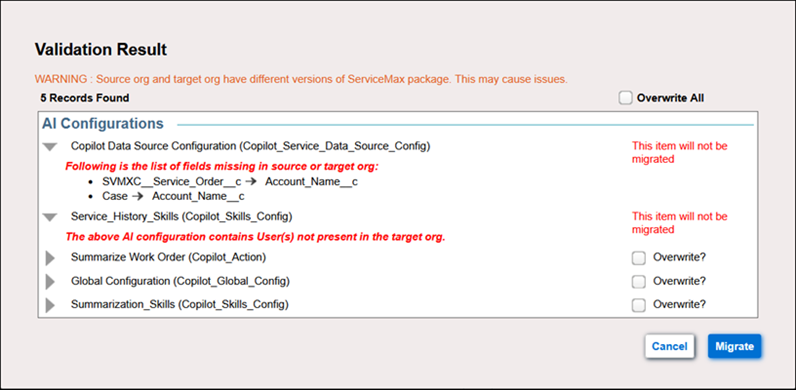
The following are the validation checks when performing migration of AI configurations:
• AI configuration migration is supported for ServiceMax Core versions 23.2 and later.
• Exporting and importing AI configurations for migration is not supported.
• Migration of AI configurations is not supported if the ServiceMax AI package is not installed in the target org.
• Migration of data source configuration is not performed if the selected fields in the data source configuration are not available in the target org.
• Migration of asset service history configuration is not performed if the asset service history configuration contains users that are not available in the target org.
• Validations for SFM Wizards containing AI Action Wizard step:
◦ If the SFM Wizards selected for migration contain AI Action Wizard step and the target org does not contain AI package, AI Action Wizard step is not migrated. Wizard steps are rearranged accordingly in the target org post migration.
◦ During migration of Wizards containing AI Configurations through the export/import flow, AI Action Wizard step is not migrated. Wizard steps are rearranged accordingly in target org post migration.
• Knowledge Access and Schedule Management AI configurations are not supported for migration.
• MCP Server Configuration is supported only if the AI package version on the target org is 4.0 or above.
• When migrating an MCP Server Configuration, If the AI Action in the source org is associated with one MCP Server, but in the target org the same AI Action is associated with a different MCP Server or Tool, the following error message is displayed:
“The <AI Action> configured with the <MCP Server Config name> is associated with different MCP Server/Tools in the target org. Migration will not be allowed.”
• When migrating an MCP Server Configuration, If the MCP Server or Tool in the source org is associated with one AI Action, but in the target org the same MCP Server or Tool is associated with a different AI Action, the following error message is displayed:
“The <MCP Server Config name> is configured with different AI Action in the target org. Migration will not be allowed.”
• The dependent AI Action is migrated along with the MCP Service Configuration after successful validation in the target org.