Editing a Root Cause Applicability
You can edit an existing Root Cause Applicability to update its associated products, product lines, product families, or custom fields.
To edit a Root Cause Applicability:
1. Click the App Launcher, type Root Cause Applicabilities in the search bar, and select it from the results.
The Root Cause Applicabilities page is displayed. The list view provides key details for each record, including record number, product, product line, product family, and root cause.

2. In the list view, select the record number in the Record Number column to edit the relevant Root Cause Applicability.
The selected Root Cause Applicability record page is displayed.
3. Click Edit.
The Edit Root Cause Applicability pop-up window is displayed.
 |
You can edit a Root Cause Applicability in several ways:
• Inline editing from the record page: On the Details tab, click the pencil icons next to Product, Product Line, or Product Family to update them directly.
• From the list view: On the Root Cause Applicabilities page, click the More Actions menu next to the record number and select Edit.
• From a specific root cause: Go to ServiceMax Setup > Investigations > Manage Root Causes, select the root cause, open the Related tab, locate the Root Cause Applicabilities section, click the More Actions menu, and select Edit.
|
4. Update the necessary fields, such as Product, Product Line, Product Family, or any custom fields.
|
|
• The Record Number and Root Cause fields cannot be edited. Record Number is system-generated, and the Root Cause field becomes read-only after a root cause is linked to the Root Cause Applicability. field cannot be
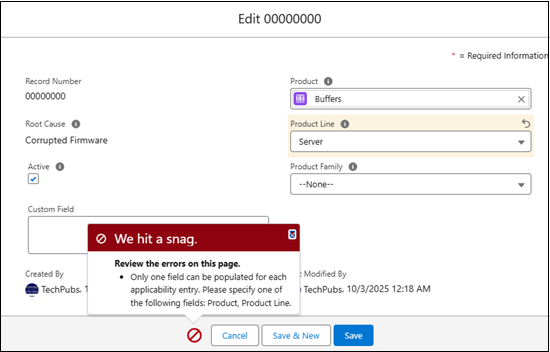
• When editing a Root Cause Applicability, make sure only one of the following fields is populated: Product Family, Product, Product Line, or Custom Field. If more than one field is populated, the system displays an error.
 |
5. Select the Active checkbox to enable the Root Cause Applicability for service processes and applicability matching or clear it to disable the record so it is not used or displayed during service processes.
You can view the Created By and Last Modified By information, including the date and time, on the Root Cause Applicability record page as well as in the Edit Root Cause Applicability pop-up window.
6. Click Save to apply your changes or Cancel to discard them.