Enabling Lightning Widget for Technical Attributes
The Technical Attributes widget allows technicians to view and capture attribute value for an installed product on the lightning record page. For more information, see Viewing and Updating Technical Attributes Using Lightning Widget.
To enable the lightning widget for technical attributes:
1. Open an Installed Base record.
2. Go to Salesforce Setup > Edit Page. The Lightning App Builder page is displayed.
3. In Search Components, search for Core - Technical Attributes.
4. Drag and drop the Technical Attribute component in the required section.
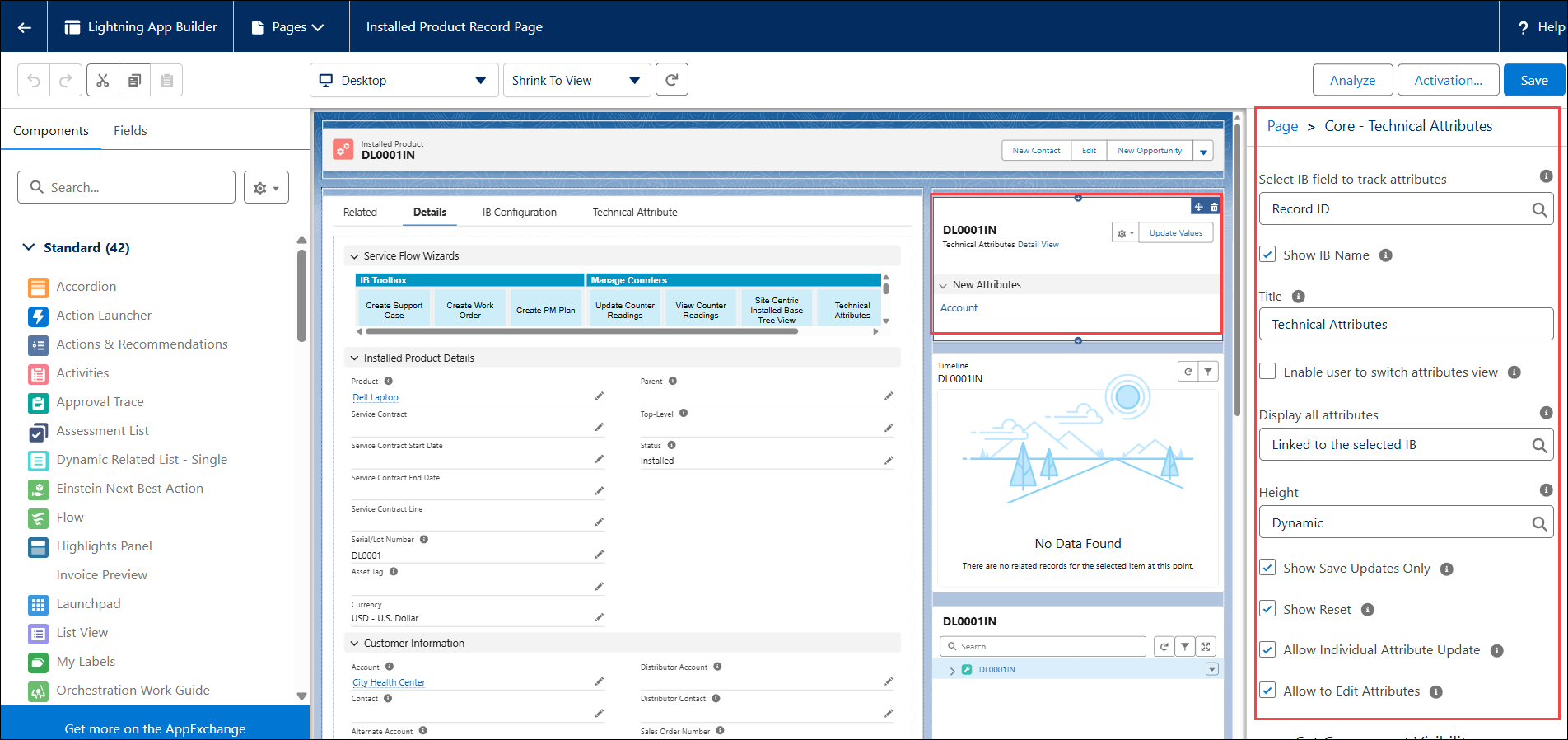
5. Click the added Technical Attributes component, and then enter the details in the Page > Core - Technical Attributes section.
|
Field
|
Description
|
|---|---|
|
Mandatory fields are marked with an * asterisk.
|
|
|
Select the IB field to track attributes*
|
You can select the IB lookup field from the list for which attributes must be viewed. For example, Record ID.
|
|
Show IB Name
|
You can select this checkbox to display the IB name in the attributes component.
|
|
Title
|
You can specify the title to display in the attributes component. This name is displayed as the component name on the UI. For example, Technical Attributes.
|
|
Enable user to switch attributes view
|
You can select this checkbox to allow the user to switch the attribute view. This checkbox when cleared, displays the attributes as per the Display all attributes property selection.
|
|
Display all attributes
|
You can select an option to display attributes on the UI by default. Available options are:
From matching templates: Selecting this option will display only those attributes that are defined in the Technical Attribute template for the installed product as per application criteria.
Linked to selected IB: Selecting this option will display all attributes associated with the installed product.
|
|
Height
|
You can specify the height of the component. The options are Small and Large setting a predefined height. Selecting Dynamic auto-adjusts the height to show all attributes.
|
|
Set Component Visibility
|
For more information, see Setting Component Visibility
|
|
Show Save Updates Only
|
Select this option to display the Save Updates Only button, allowing users to save only the modified attributes. If not selected, this button is hidden. By default, this is enabled.
|
|
Show Reset
|
Select this option to display the Reset button, allowing users to discard changes and restore the last saved values. If not selected, this button is hidden. By default, this is enabled.
|
|
Allow to Edit Attributes
|
Select this option to allow users to record attribute values. If not selected, users can only view attribute values and history. By default, this is enabled.
|
|
Allow Individual Attribute Update
|
Select this option to allow users to update attribute values individually. You must enable Allow to Edit Attributes option. If not selected, individual attribute updates are not allowed. By default, this is enabled.
|
6. Click the Activation tab and provide permission to the apps, user's desktop, and mobile to view this component.
7. Click Save.
Setting Component Visibility
You can add filters for the Techincal Attributes component to set component visibility.
To add filters:
1. Expand the Set Component Visibility section.
2. Click Add Filter.
3. Select the Filter Type - Record Field, Device, or Advanced.
4. Select the filter criteria using the Filed-Operator-Value pair.
5. Click Done to save the filter.
 |
You can add multiple filters.
|