Date and Time Fields
The DateTime field provides a date picker to choose the date and the time in dd:mm:yyyy and hh:mm format. The following configuration settings are available for the DateTime fields.
• In SFM Lightning Delivery, the time interval in the drop-down is displayed based on the value defined in the global settings (SET008).
• In the date picker, the first day of the week is Sunday by default. To change the first day of the week, use the SET009 setting and set the value to either User Locale or any other day. The 'User Locale' option displays the first day as per the logged-in user's locale. For more information, see SET009.
 |
If time is not specified, then the default value of 12:00 PM in case of 12-hour format or 12:00 in case of 24-hour format is set.
|
Current Date and Time
The Date and Time fields provide an efficient way to enter scheduling information during data entry. The Time picker supports guided selection by presenting the most relevant time options during use.
• Smart Scrolling: If a time has already been selected, the picker automatically scrolls to that time and positions it near the center of the visible list, reducing manual scrolling.
• Suggested Time: If no time is selected, the picker displays the time closest to the current system time to help users make quicker selections.
• Time Zone Alignment: The displayed and selected time values automatically reflect the logged-in user’s time zone to support accurate and region-appropriate entry.
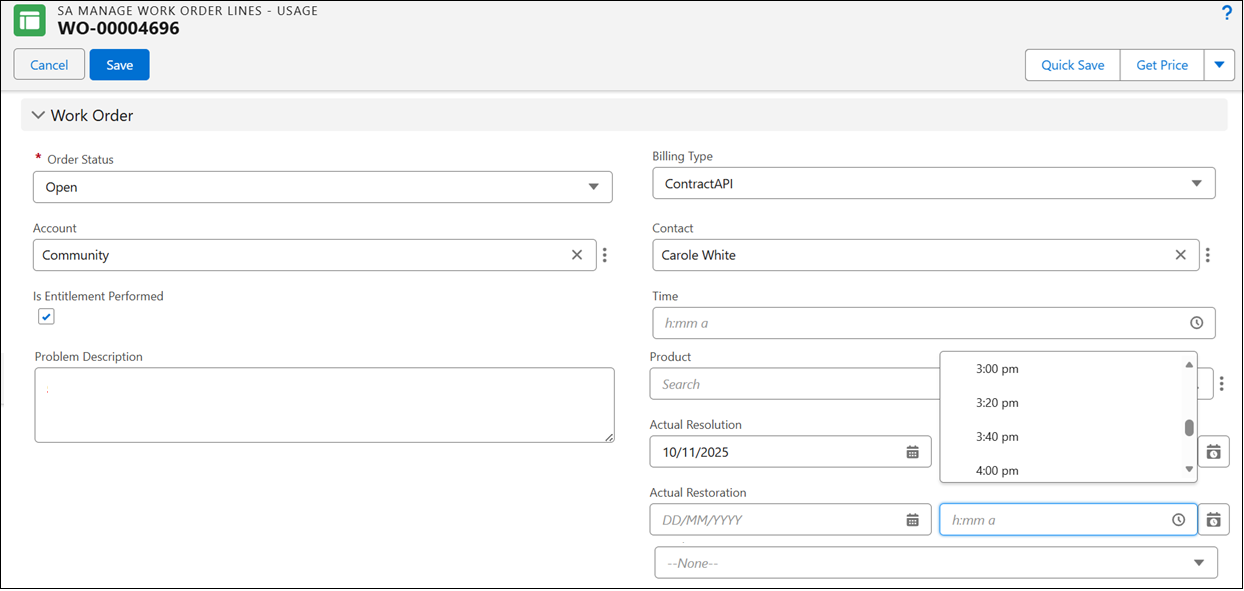
The date and time displayed are aligned with the user's time zone. To auto-fill the current date and time, click the Now icon located on the right side of the picker.