Using the New Rich Text Format Editor
The Output Document template designer supports a new packaged rich text template editor. The new template editor coexists with the existing template editor. The new template editor will open by default. The administrator has an option to choose either old or new editor to manage the template. By default, both the editors are available in the Template Designer. You can hide the new editor in the Template Designer by setting the Global Setting GBL045 value to false.
The New template editor has all the properties similar to the existing template editor. You can modify the existing templates with new editor and vice versa without losing any data.
The following are the limitations of the new editor:
• The New editor does not support Source code indentation.
• You cannot add Fields and Functions directly into source code using actions such as Insert Label, Insert Value, and Add Function. Instead, you can add them from the Template Designer UI and modify within source code.
To open an existing template or create a new template using new editor:
1. Navigate to > > .
The Output Doc List is displayed.
2. Click to open an Output Document from the list.
3. Navigate to the Template Designer tab.
By default, the template is rendered with New editor. The template is rendered with new editor.
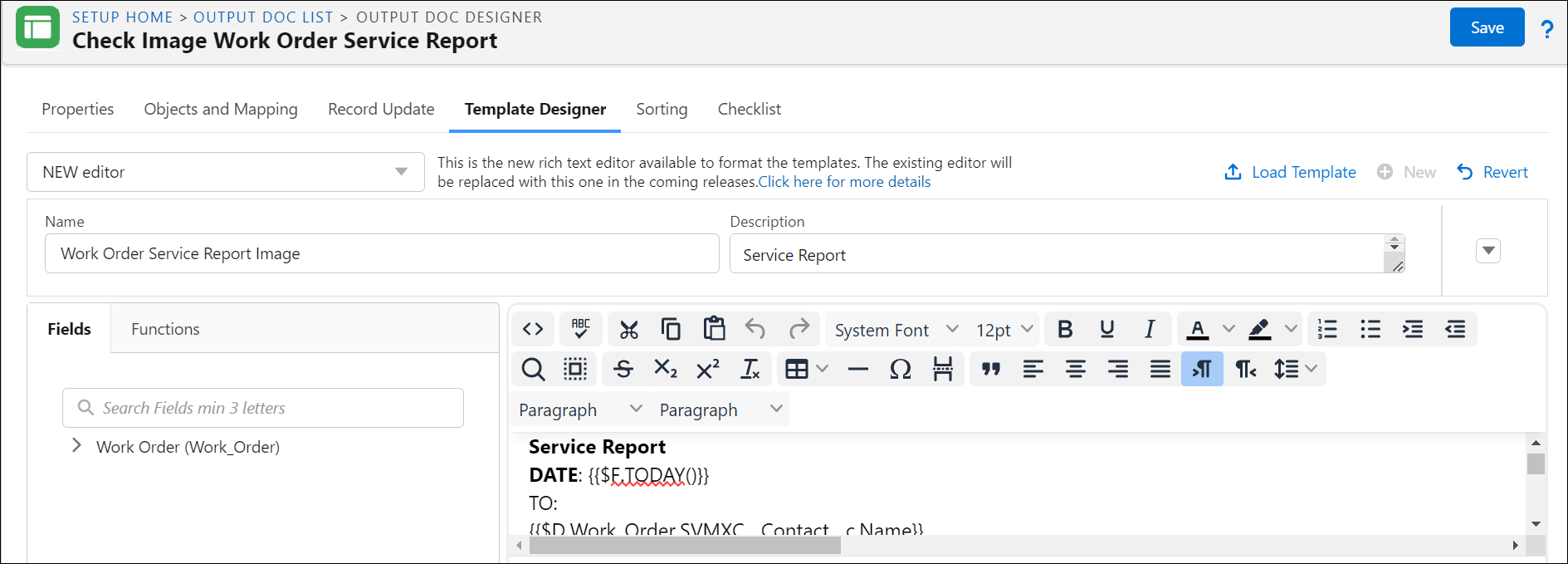
4. Click Confirm.
5. Make necessary changes to the template and click Save.
 |
• You can also switch back to the old editor by clicking the End-of-life-editor(old) option from the picklist.
|