Custom Action to Launch Record with Default Values
You can configure a Custom Action to launch standard Salesforce’s create record pages with pre-populated field values. By configuring Custom Action SFM of action type URL as a wizard step, you can launch a standard record page (Account, Contact, and so on) with default values populated.
The field values are populated based on the parameters defined in the custom action configuration. The Salesforce record page always opens in lightning experience. This auto-mapping capability reduces manual input and helps users to create accurate records, reducing ambiguity.
To launch a standard Salesforce record page with pre-defined values via Custom Action, you must:
• Provide the record page url in this format:
/lightning/o/Account/new?defaultFieldValues=
Ensure that the ?defaultFieldValues= is appended in the URL. This ensures the default values configured in the Custom Action are automatically populated when the Custom Action is launched.
• Add parameter names and their values to define the fields that must be pre-populated.
 |
• This feature is supported only on the Web.
• The system populates default field values only for new record in the Lightning Experience. It does not populate them for updates to existing record.
|
For example, you want to create a new Account record from an existing Account with similar details. By clicking a Custom Action URL, the Account creation page opens with fields prep-populated with default values such as:
• Name: Iniscope
• Phone Number: 123-456-789
To create and configure a Custom Action:
1. Go to ServiceMax Setup > Service Flow Manager > Custom Actions.
2. In the Manage Custom Actions for, select the Object. For example, Account.
3. In the User-defined Custom Actions, click New.
4. In the Action Type, select URL.
5. Provide the details for the fields as described in the following table:
|
Field
|
Description
|
||
|---|---|---|---|
|
Object
|
Specifies the name of the Object. For example, Account. This field is auto-populated based on the source record.
|
||
|
Action Title
|
Enter the name of the Action.
|
||
|
Action ID
|
Specifies the unique identification of the Action. This field is auto-populated when you enter the Name.
|
||
|
Description
|
Enter a brief description of the Custom Action.
|
||
|
Open URL in
|
Select the required option to launch the Custom Action URL in New Window or Existing window.
|
||
|
URL to Launch
|
Enter the URL in the following format to launch the Action:
/lightning/o/Account/new?defaultFieldValues=
Ensure that the ?defaultFieldValues= appended in the URL. The fields configured in the Custom Action are automatically populated when the Custom Action is launched for creating the Account record.
|
||
|
Window Height
|
Enter the height of the new window to be launched for the Action. The value is auto-populated. You can modify the height based on your requirements.
|
||
|
Window Width
|
Enter the width of the new window to be launched for the Action. The value is auto-populated. You can modify the height based on your requirements.
|
||
|
Open As Full Window
|
Select this option to launch the URL in full window.
|
||
|
Show Scrollbars
|
Select this checkbox to enable scrollbars when launching a new window.
|
6. Click Add to add a new Parameter and its value. This specifies the field that must be pre-populated.
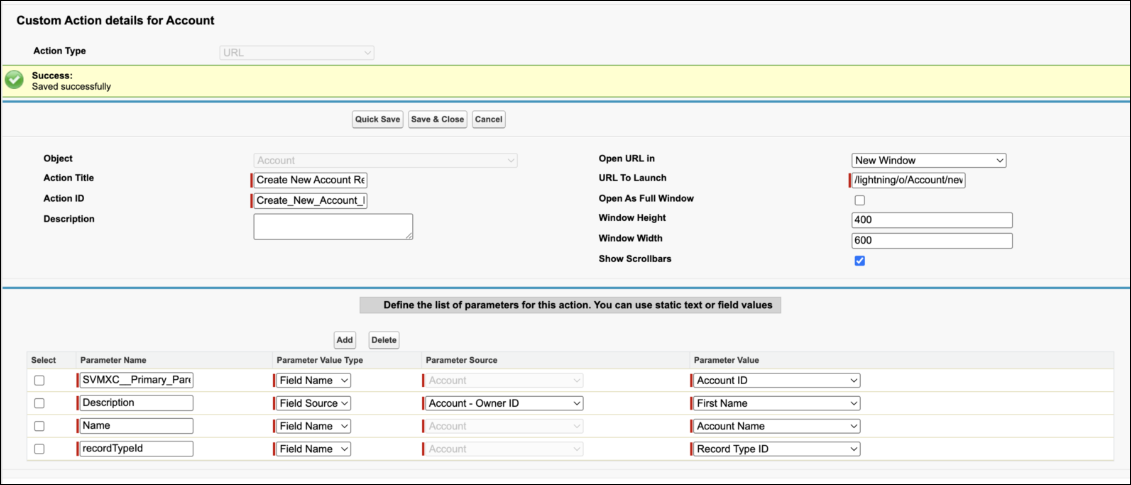
7. Enter the Parameter Name and select Parameter Value Type from the drop-down. Similarly, add multiple parameters based on your requirements.
8. Click Save.
When you launch the Custom Action, the configured fields are pre-populated with default values. For more information to launch a Custom Action SFM, see Launching an SFM Transaction.