Adding Covered Work Plan
You can add covered work plans to a service or maintenance contract to define which service or logistics activities are included under contract coverage. Covered work plans ensure that entitlement checks apply the correct coverage based on the configured rules, helping maintain consistency between service delivery and contract terms. During entitlement evaluation, the system automatically applies the relevant service contract coverage based on the entitlement rule.
To add a covered work plan to a service contract:
1. From the Home page, select Service/Maintenance Contracts.
The Service/maintenance Contracts page is displayed.
2. Click the Contract record for which you want to add a covered work plan.
3. In the Service Flow Wizard panel, under Terms & Coverages section, select Coverages.
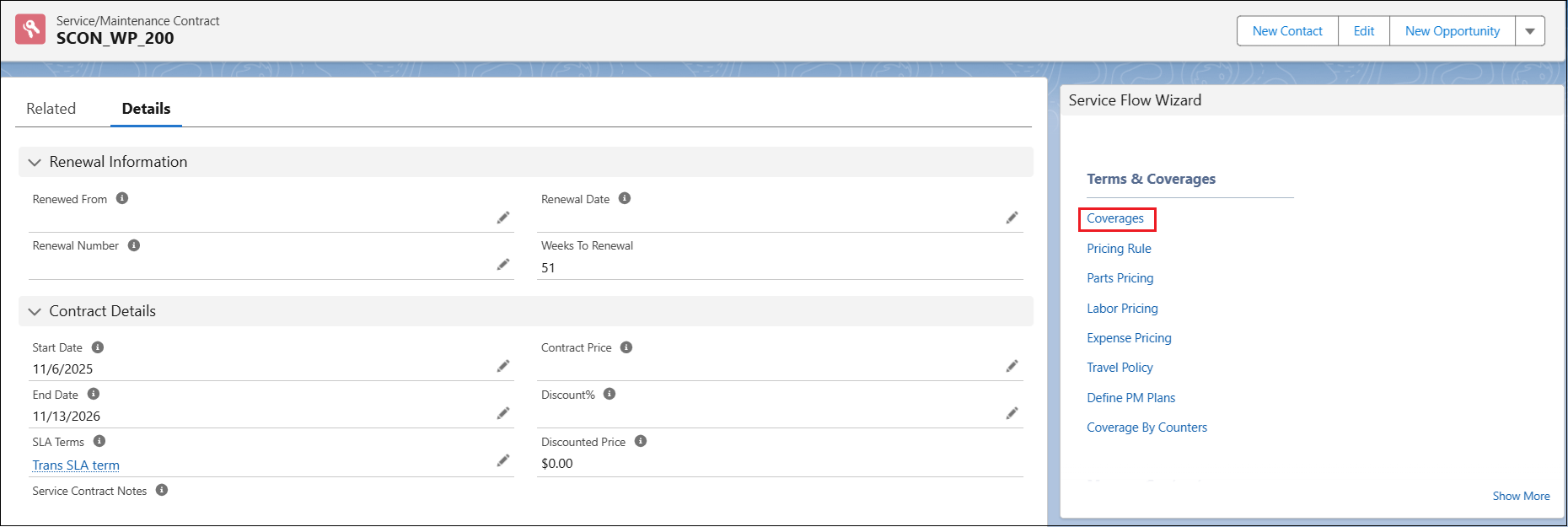
The Edit Coverage standard SFM page opens for the service or maintenance contract.
4. Select the Covered Work Plans tab.
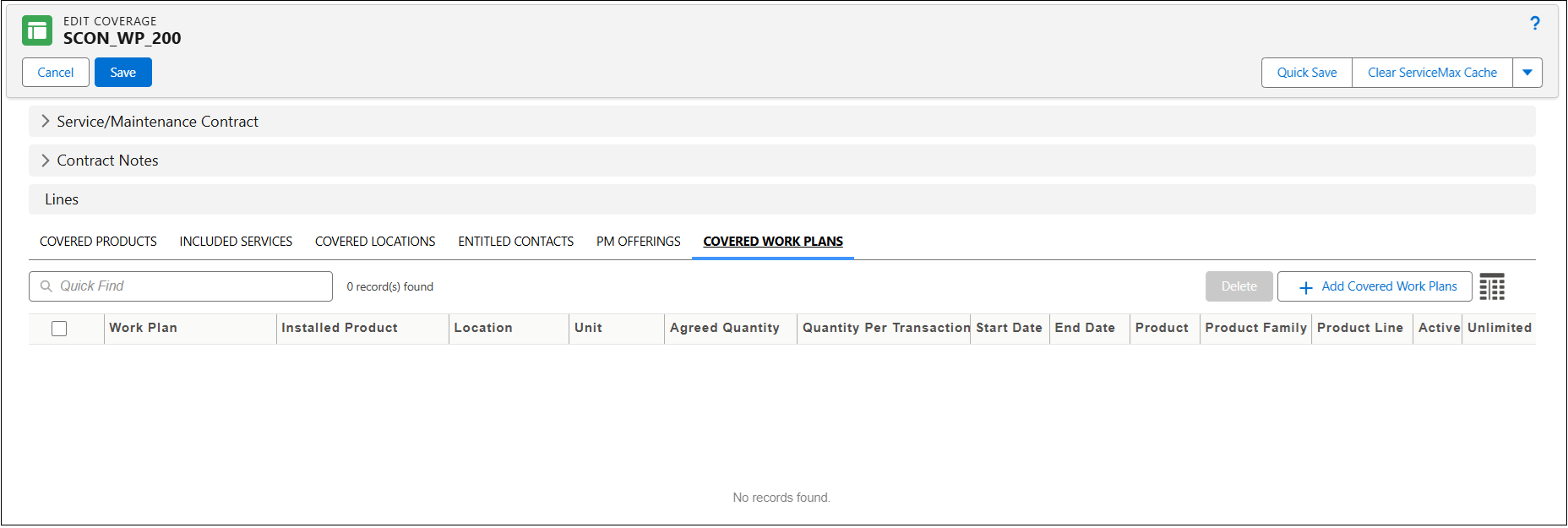
5. In the Lines section, under the Covered Work Plans tab, click Add Covered Work Plans.
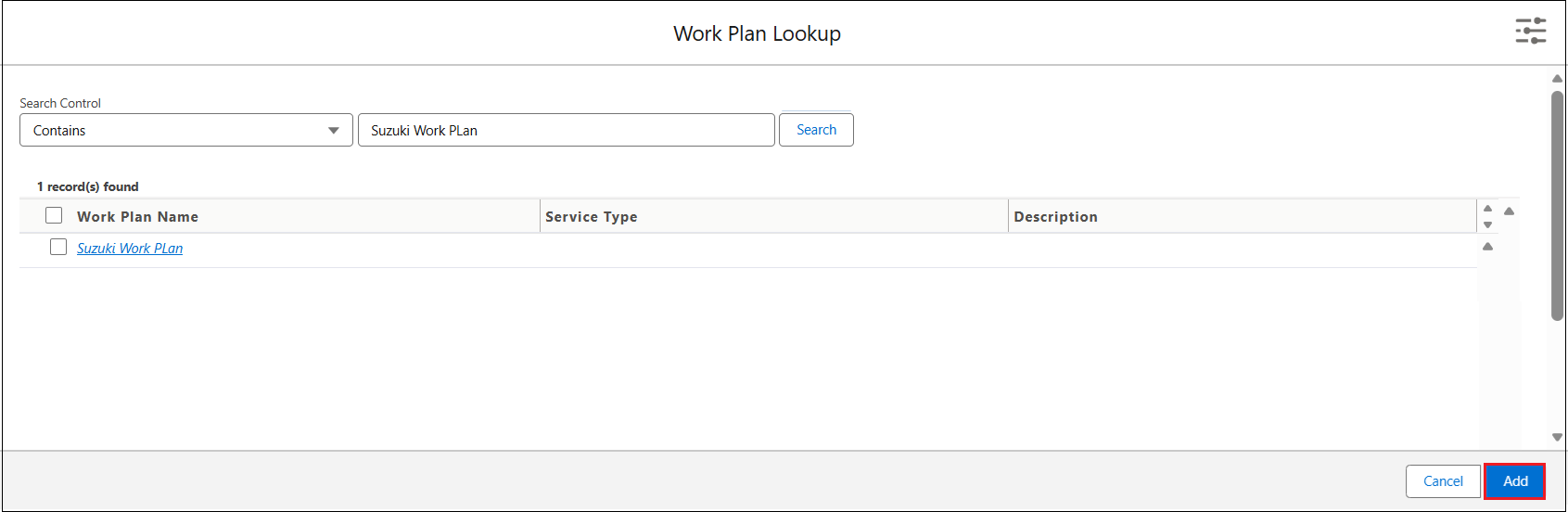
The Work Plan Lookup window is displayed.
 |
You can only view the recently viewed work plan names in the Results section.
|
6. In the Quick Find text box, search for the required work plan name, and then click Search.
7. Select the required work plan name, and then click Add.
A new row is created in the Covered Work Plans tab.
8. Provide the details for the fields as described in the following table.
|
Field
|
Description
|
||
|---|---|---|---|
|
Work Plan
|
Displays the work plan to associate with the service contract. Search and select the Work Plan you want to add to the Service Contract.
|
||
|
Installed Product
|
Displays the installed product covered under this work plan. Select the installed product that you want this work plan to cover.
|
||
|
Location
|
Displays the site or region covered under this plan. Select the location that you want this work plan to cover.
|
||
|
Unit
|
Displays the measurement unit for entitlement tracking. Select the unit based on which you want to offer the service. The Unit can be Hours, Count, Credits, or Amount.
|
||
|
Agreed Quantity
|
Displays the total number of services to be provided under this work plan. Enter the number of services agreed to be provided under this work plan.
|
||
|
Quantity Per Transaction
|
Indicates the Quantity that must be allocated with each successful entitlement. Default value is 1. For example, if 4 hours must be allocated with each entitlement check, where Unit is Hours, then enter the required value as 4.
|
||
|
Start Date
|
Displays when coverage begins. Enter the coverage’s start date.
|
||
|
End Date
|
Displays when coverage ends. Enter the coverage’s end date.
|
||
|
Product
|
Displays the product for which the covered work plan is offered under service contract. Select the product if you want to limit the work plan coverage to specific product.
|
||
|
Product Family
|
Displays the product family to which the covered work plan belongs. Select the relevant product family from the dropdown.
|
||
|
Product Line
|
Displays the product line associated with the covered work plan. Select the applicable product line from the dropdown.
|
||
|
Active
|
Determines whether the covered work plan is considered during entitlement checks. Select this checkbox to consider the covered work plan for entitlement.
|
||
|
Unlimited Coverage
|
Select this checkbox to allow unlimited entitlement allocation. When enabled system ignores Agreed Quantity and entitles qualified record with this work plan every time entitlement check is performed within the validity period.
|
||
|
Part Coverage
|
Specifies the percentage of part costs covered under the work plan. Enter the applicable percentage.
|
||
|
Labor Coverage
|
Defines the percentage of labor costs covered under the work plan. Enter the applicable percentage.
|
||
|
Expense Coverage
|
Specifies the percentage of expense costs covered under the work plan. Enter the applicable percentage.
|
|
|
To add a new row for the Covered Work Plan, select the Add Covered Work Plans button and add a work plan. Alternatively, in the Covered Work Plans tab, select the down arrow icon next to an existing Covered Work Plan record, and then select Clone. A new row is created, and you can modify the details as needed.
|
9. To save the changes and to stay on the Edit Coverage page, click Quick Save.
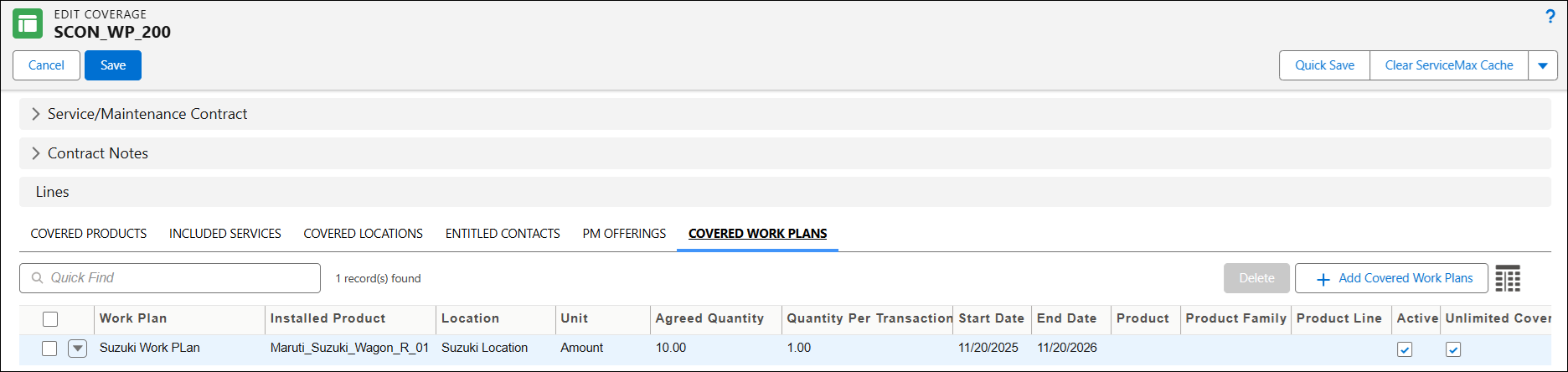
10. To save the changes and navigate back to the Details tab, click Save.
In the Related tab, under the Covered Work Plans section, you can view, add, edit, and delete Covered Work Plans for the selected Service Contract. For more information, see Editing a Covered Work Plan from a Service Maintenance Contract and Deleting a Covered Work Plan from a Service Maintenance Contract.