Viewing Service Tasks
To view service tasks in a Work Order:
1. Open the Work Order for which you want to view service tasks.
2. Click the Service Products & Tasks tab.
Associated service products, service tasks, or work plans, if any, are displayed.
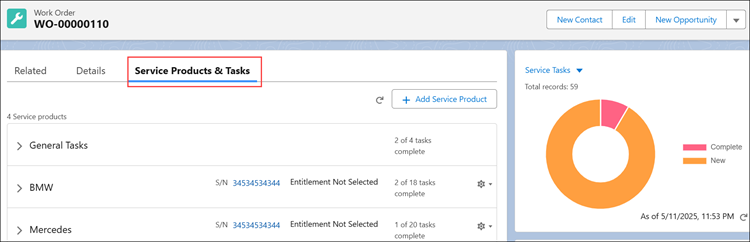
3. Expand General Tasks to view service tasks added directly to the Work Order.
4. In the Service Products section, expand a Service Product to view related Work Plans and service tasks added to the Service Product.
The Service Tasks displays the following information in different columns:
|
Column
|
Description
|
|
Task
|
Indicates the task name.
|
|
Type
|
Indicates the task type. The type can be Simple Task, SFM, Output Document, and so on.
|
|
Assigned To
|
Indicates the technician for whom the task is assigned.
|
|
Status
|
Indicates the current status of the task. The Status can be New, In Progress, and Completed.
|
5. Click a task to view and modify various fields.
Related Topics