Marking a Service Task as Complete from the Task Queue
In the Service Task view, you can mark your simple task as complete directly from the task queue. This enables technicians and service engineers to quickly complete their simple tasks. Note that you cannot mark advanced tasks such as SFM, Output Document, Data Guide Form and Document Template tasks as complete from the task queue. Instead, you can launch the linked activity from the queue using the l.aunch option.
To mark a service task as complete from the task queue:
1. From the Home page, go to the Service Tasks tab.
The list of Service Tasks assigned to you is displayed.
2. From the task queue, go to a simple task and click Mark Complete.
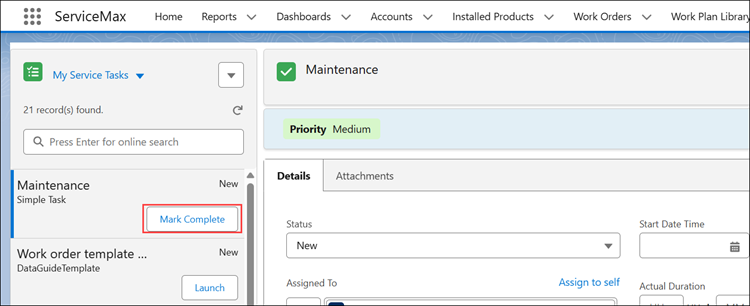
A success message is displayed indicating that the task is completed. You can view completed tasks in the Recently Complete list view. In the task view, you can verify that the status is set to "Complete" and that the fields are non-editable.