Uploading Documents Using Knowledge Access API
The Knowledge Access API enables admins to programmatically upload documents into the Knowledge Access Agent’s storage using a Push API. It supports uploading from external repositories such as internal knowledge bases or third-party systems, without relying on manual uploads via the AI Console.
This feature offers flexibility for integrating diverse document sources into the agent’s knowledge base. It is especially beneficial for admins who maintain documentation outside Salesforce, Microsoft OneDrive, or Microsoft SharePoint and require a streamlined upload mechanism. Using API-based uploads, admins can easily automate document transfers and maintain traceability through source URLs.
Use Cases
The following list represents some use cases for the Knowledge Access API feature:
• Upload product-specific troubleshooting guides from internal repositories.
• Upload Frequently Asked Questions (FAQs) stored in external systems.
• Automate document uploads during release cycles or product updates.
• Link uploaded documents to their source to ensure traceability.
|
Prerequisites
|
|---|
|
To enable this feature, ensure the following:
• The ServiceMax AI package must be installed on the Salesforce instance.
• The token must have permissions equivalent to the AI Console Admin.
|
To upload documents using the Push API, perform the following steps.
1. Create a PDF or TXT file containing relevant content such as error codes or FAQs.
2. Use Postman or any API client to send the request.
The Add Document window is displayed.
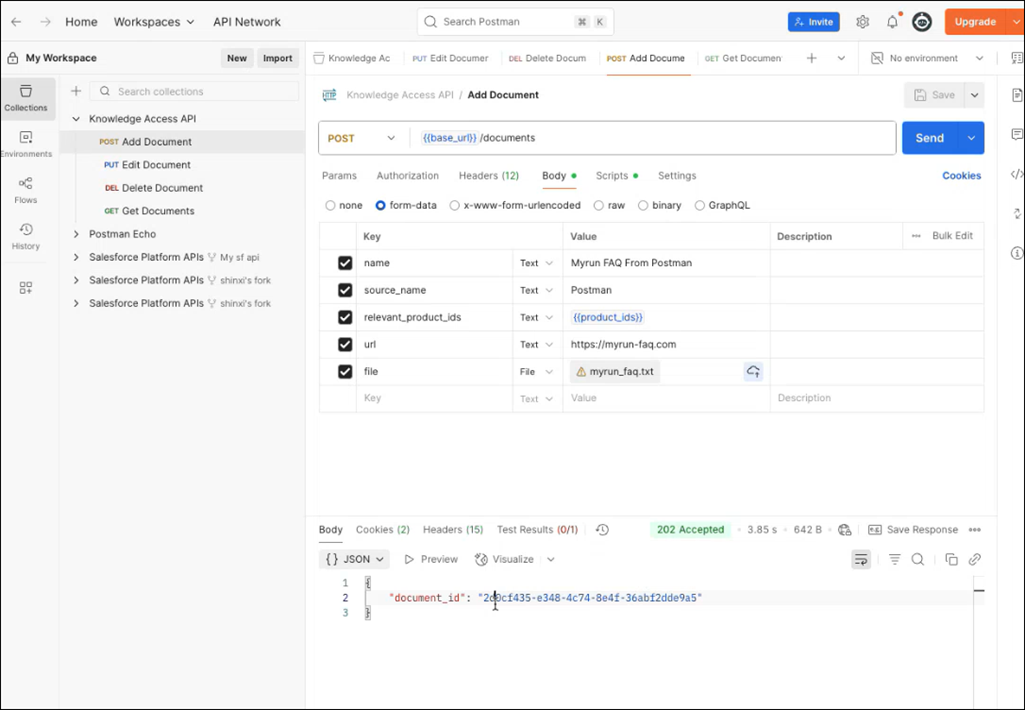
3. Provide the details for the fields as described in the following table.
|
Field
|
Description
|
||
|---|---|---|---|
|
POST Add Document
|
Set the request type to POST and select the POST Add Document API. In the request body, include the name, source_name, relevant_product_ids, url, and file keys. Upload the document, select Send, and confirm a 202 Accepted response to verify successful upload.
This API creates a searchable document using the provided metadata and content.
|
||
|
GET Get Documents
|
Select the GET Get Documents API to check if the document is active.
This API confirms whether a document is available for search by the agent.
Log in to Zinc or the Go App, to ask questions related to the uploaded document. The ServiceMax AI Assistant responds based on the uploaded content.
|
||
|
PUT Edit Document
|
Select the PUT Edit Document API and update the keys as required.
This API modifies the existing document metadata or content.
|
||
|
DEL Delete Document
|
Select the DEL Delete Document API and provide the document ID to delete it from the knowledge base.
This API permanently deletes the document and removes it from the agent’s storage.
|
 |
• If a source URL is provided, the agent redirects you to the original document location.
• If no URL is provided, the agent displays the uploaded file stored in its internal storage.
• The GET, EDIT, and DELETE APIs only work on documents uploaded via the Knowledge Access API. They do not apply to documents uploaded manually through the AI Console.
|
The Knowledge Access API enables admins to automate document uploads from external sources, improving agent responsiveness and support efficiency.
Related Topic: