Sending Broadcasts
You can send Broadcasts from the Admin Console, Zinc Mobile, or Zinc Desktop, and choose to show the sender as yourself or your Organization. Broadcasts can be sent immediately or scheduled in advance, and you can opt to show them on users' screens until manually dismissed, or deliver them to the Broadcast Content Hub. Recipients can be any or all of the following:
• All participants in a Conversation.
• All members of a Broadcast List.
• Official Groups and Folders.
• All users who are assigned specific User Properties.
• Custom sets of individual recipients.
To send Broadcasts, you must have the Organization Admin, Team Admin, or Broadcaster role. After you send or schedule Broadcasts, they appear on the Broadcasts tab, where you can make changes and track and manage their read rates and expiration dates.
To send Broadcasts:
1. In the Admin Console, do any of the following:
◦ On the Broadcasts tab, in the top right corner, click Send Broadcast, and then on the Compose Broadcast page, in the Recipients field, enter users, User Properties, Official Groups, Folders, and Broadcast Lists.
◦ On the Broadcast Lists tab, select the check boxes to the left of the Broadcast Lists to which you want to send a Broadcast, and then in the top left corner, click Send Broadcast.
◦ On the Users tab, select the check boxes to the left of the users to whom you want to send a Broadcast, and then in the top left corner, click Send Broadcast.
◦ On the Official Groups tab, select the check boxes to the left of the Folders or OfficialGroups to which you want to send a Broadcast, and then in the top left corner, click Send Broadcast.
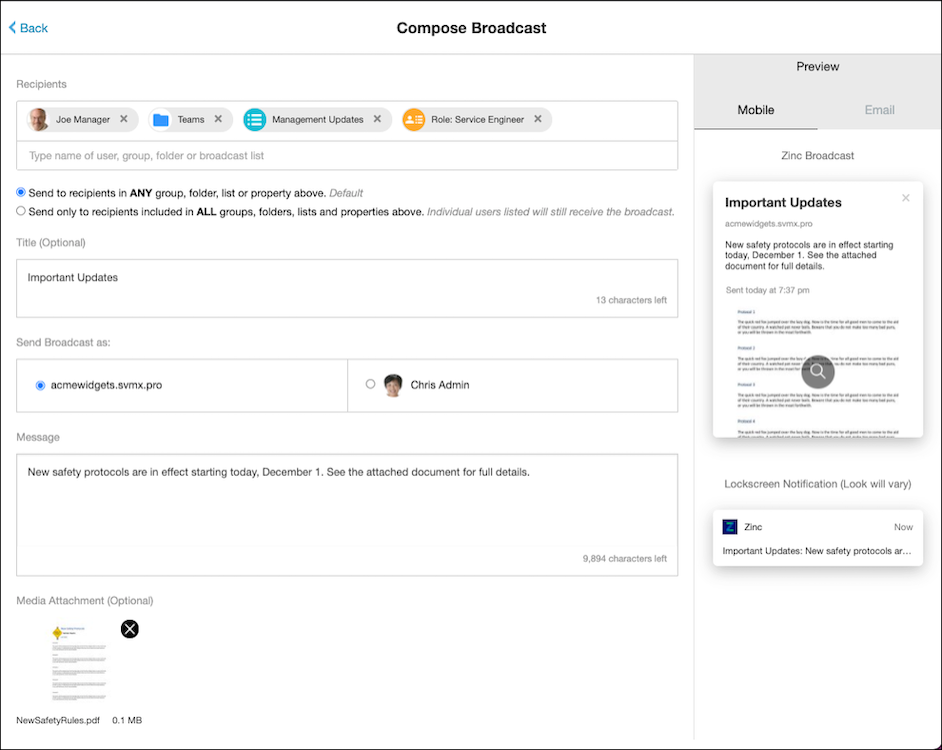
2. Alternatively, in Zinc Desktop or Zinc Mobile, on the Broadcasts tab, in the top right corner, click New Broadcast ( ), and then on the Compose Broadcast page, in the Recipients field, enter users, User Properties, Official Groups, Folders, and Broadcast Lists.
), and then on the Compose Broadcast page, in the Recipients field, enter users, User Properties, Official Groups, Folders, and Broadcast Lists.
 |
In Zinc Mobile 7.0 and later, you can no longer send Broadcasts from the Group Conversation Settings screen.
|
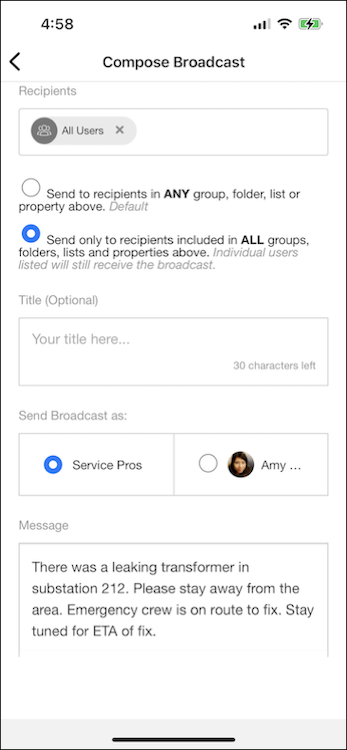
3. On the Compose Broadcast page, complete the fields as follows, and then at the bottom of the page, click Send.
|
Field
|
Value
|
|---|---|
|
Send to buttons
|
By default, Broadcasts are sent to recipients in any Group, Folder, or Broadcast List or who have the User Properties you specify in the Recipients field. You can choose to send a Broadcast only to recipients who match all of your specified Groups and Folders, Broadcast Lists, and User Properties.
|
|
Title (Optional)
|
Enter a title for the Broadcast.
|
|
Send Broadcast as
|
Choose whether to send the Broadcast as yourself or as your Organization.
|
|
Message
|
Type a message of up to 10,000 characters.
|
|
Media Attachment (Optional)
|
Attach one document, image, or media file. Multiple attachments are not supported.
|
|
Link (Optional)
|
Enter a call-to-action link to support click-through tracking at the individual and aggregate level.
|
|
Send
|
Select Send now, or click the date-time field to specify a schedule for the Broadcast.
|
|
Expire
|
Select Never, or click the date-time field to specify when you want the Broadcast to expire.
|
|
Delivery
|
Select Urgent to keep the Broadcast on users' screens until they dismiss it, or Informational to deliver the Broadcast to the Broadcast Content Hub.
|
For more information: