Configuring Custom Fields and Visualforce Pages
To start Embedded Zinc configuration, you create a custom field named Zinc External ID and add it to the page layouts for all Salesforce and ServiceMax record types to which you want to add Zinc, or to which you want to configure Hotline or Conversation links in other apps such as ServiceMax Go. You then create Visualforce UI pages to be added to page layouts. Some standard Salesforce and ServiceMax record types are supported out-of-the-box, and you can also configure support for custom record types.
To configure custom fields and Visualforce pages:
1. In Salesforce, create a custom field named Zinc External ID with the following settings and add it to the record types you want to configure.
◦ API Name: Zinc_External_ID
◦ Formula Options: $Label.ZINC_Work_Order & CASESAFEID(Id)
 |
The following Salesforce and ServiceMax record types are supported out-of-the-box:
• Account
• Case
• Contact
• Installed Product (ServiceMax)
• Lead
• Location (ServiceMax)
• Opportunity
• Work Order (Salesforce or ServiceMax)
|
2. On the Salesforce Setup page, in the left pane, in the Platform Tools section, under Custom Code, click Visualforce Pages, and then click New,
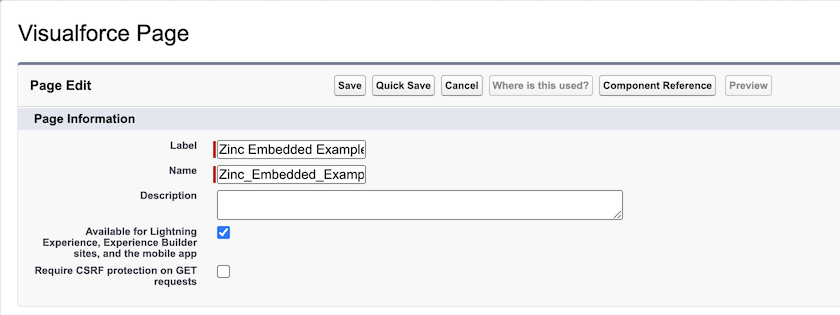
3. Complete the fields as follows to create Visualforce UI pages for each record type for which you want to configure Zinc support.
|
Field
|
Value
|
||
|---|---|---|---|
|
Label
|
The name you want to use for this Visualforce page in the Salesforce UI, for example, Zinc Embedded Account.
|
||
|
Name
|
The API name for the Visualforce page, for example, Zinc_Embedded_Account.
|
||
|
Available for Lightning Experience... check box
|
Selected
|
||
|
VisualForce Markup
|
Copy and paste the Apex code in the sample below into the editor. Replace <RecordType_APIName> with the API name of the record type you are configuring, and replace <RecordType>-<ExternalResourceName> with sfdc for Salesforce record types or smax for ServiceMax Core record types, plus the name of the relevant Zinc external resource.
The following record types are supported:
Salesforce (sfdc)
• Account (account)
• Case (case)
• Contact (contact)
• Lead (lead)
• Location (location)
• Opportunity (opportunity)
• ServiceMax (smax)
• Installed Product (installedproduct)
• Work Order (workorder)
|
<apex:page standardController="<RecordType_APIName>" standardStylesheets="false" showHeader="false">
<style>
html {
    height: 100%;
}
body {
    margin:0 !important;
    height: 99%;
}
iframe {
    height: inherit;
}
</style>
<apex:iframe src="https://zinc-app.com/cnv?title={!<RecordType_APIName>.Name}&external_id=<RecordType>-<ExternalResourceName>-{!<RecordType_APIName>.Id}" scrolling="true" frameborder="0"/>
</apex:page>
For more information: