Configuring Sync Failure Notifications
When data sync fails due to integration errors, you can configure Appointments and Events, Jobs, and Job Dependencies to render with red or pink striped backgrounds. By default, when the Has Service-Board-To-Salesforce-Sync Errors field in failed records is set to true, Appointments and Events, Jobs, and Job Dependencies are rendered with striped backgrounds to indicate Service-Board-to-Salesforce sync errors, and Jobs are rendered with striped backgrounds to indicate Salesforce-to-Service Board sync errors. You can configure this rendering option for sync errors in one or both directions or disable it altogether, and you can also configure pop-up notifications to inform users when these errors occur.
To configure sync failure notifications:
1. To configure integration error highlighting, in Max Designer, on the Administration ( ) launchpad menu, click Settings, and then in the list view, click Configure Integration Error Type Highlighting.
) launchpad menu, click Settings, and then in the list view, click Configure Integration Error Type Highlighting.2. On the record page, on the Overview tab, in the Default Value list, select one of the following options, and then in the top left corner, click Save and Close ( ).
).
).|
Option
|
Description
|
|---|---|
|
Salesforce-to-Service-Board-Sync Errors
|
Select this option to render striped backgrounds only for Job records that have Salesforce-to-Service Board sync errors.
|
|
Service-Board-to-Salesforce-Sync Errors
|
Select this option to render striped backgrounds only for Appointment, Event, and Job records that have Service-Board-to-Salesforce sync errors.
|
|
Both (Default)
|
Select this option to render striped backgrounds for all Appointment, Event, and Job records that have Service-Board-to-Salesforce sync errors, and all Job records that have Salesforce-to-Service Board sync errors.
|
|
[None]
|
Select this option to disable all striped backgrounds.
|
3. To configure pop-up browser notifications for sync failures, in Max Admin, on the System Management ( ) launchpad menu, expand the System Management section and click Push Notification Requests, and then in the list view, in the top left corner, click Create (
 ).
).
) launchpad menu, expand the System Management section and click Push Notification Requests, and then in the list view, in the top left corner, click Create ().4. On the Push Notification Request page, on the Overview tab, complete the fields as follows.
|
Field
|
Value
|
||
|---|---|---|---|
|
Name
|
The request name, for example, Appointment Sync Failed.
|
||
|
Frequency
|
Immediately
|
||
|
Relative Importance
|
High
|
||
|
Related Object
|
Appointment, Event, Job, or Job Dependency
|
||
|
Event Type
|
Create and Update
|
||
|
Display Pop-Up Notification
|
Selected
|
||
|
Pop-Up Notification Type
|
Error
|
||
|
Notify Source User
|
Selected
|
||
|
Conditions
|
io_has_integration_error = true
|
||
|
Title
|
Title that appears at the top of the notification, for example, Appointment Sync Failed.
|
||
|
Message
|
Message that appears in the body of the notification, for example, <%= record.primaryName %> has a sync error. Check the record details, or contact your system administrator.
|
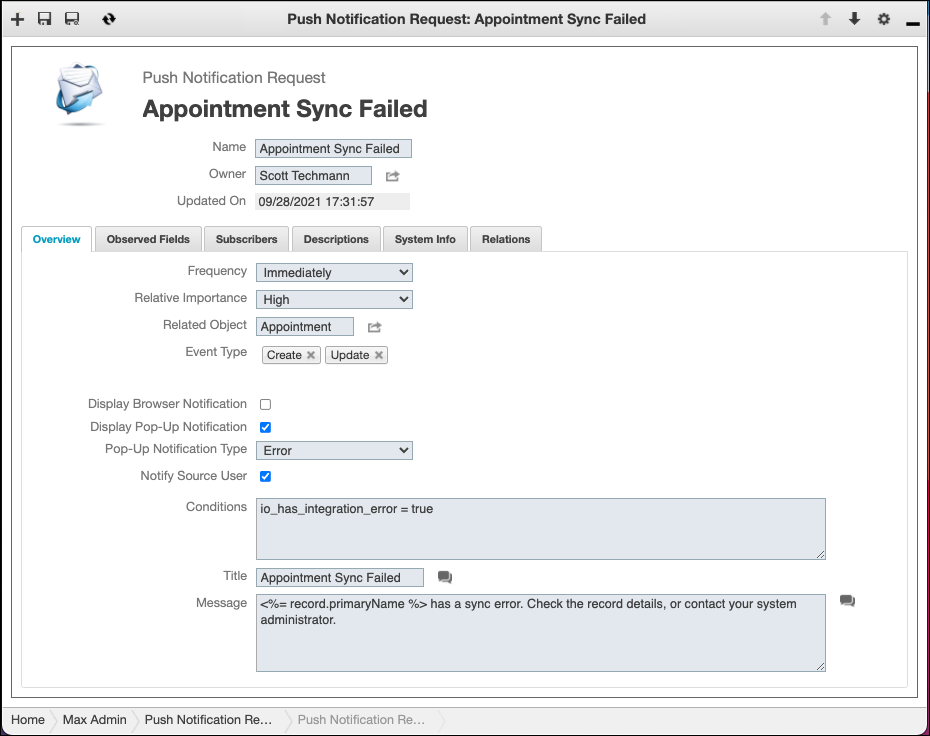
5. On the Observed Fields tab, link the Has Service-Board-to-Salesforce-Sync-Errors field, and then on the Subscribers tab, configure the users and groups to whom you want this notification to appear. For more information, see Configuring Push Notifications in Max for Administrators.
6. Repeat these steps for each record type for which you want to configure sync failure notifications.
 |
By default, only Appointment and Event, Job, and Job Dependency objects are linked to the Has Service-Board-to-Salesforce-Sync Errors field. Therefore, to configure notifications for the Crew and Crew Resource objects, you must first link the Has Service-Board-to-Salesforce-Sync Errors field to these objects.
|
For more information: