Configuring Forms
You can use Form Designer to modify form elements and options to meet your organization’s needs.
 |
You can modify only the forms that have a Custodian field value that matches the default custodian defined for your user account. If any other custodian is defined for a form, you must save it with a different name in Form Designer, and then make changes as needed. In the newly renamed form, be sure to set an appropriate value in the Primary Role or Group field to ensure access is properly granted.
|
To configure forms:
1. In Max Designer, on the Developer Tools ( ) launchpad menu, click Object Designer, and then in the left pane, click the object for which you want to configure a form.
) launchpad menu, click Object Designer, and then in the left pane, click the object for which you want to configure a form.2. On the object design page, in the left column, click Forms, and then in the list view, click the form you want to configure.
3. In the right pane, click Go to Form Designer.
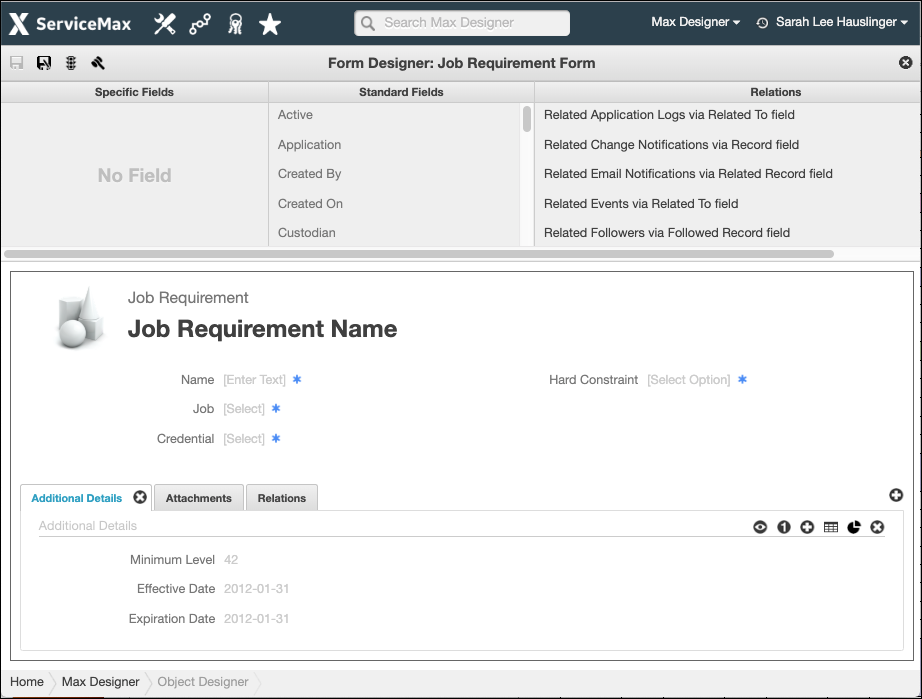
4. In Form Designer, in the top left corner, click Save As ( ), and then in the Name and Primary Role or Group fields, enter a name and set an appropriate value to ensure access is properly granted.
), and then in the Name and Primary Role or Group fields, enter a name and set an appropriate value to ensure access is properly granted.5. Drag and drop fields from any of the following areas into the Form Editor pane at the bottom of the page:
◦ Specific Fields: Custom fields included in the object.
◦ Standard Fields: Standard fields included in the object.
◦ Relations: Relationships that reference this object as their target or source.
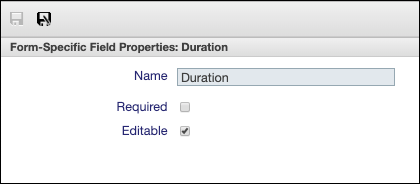
6. To make fields editable, required, or both, double-click the field names, and then in the Form-Specific Field Properties pane, select the Editable and Required check boxes as needed.
7. To configure tab sections, click the following icons in the Form Editor.
|
Icon
|
Function
|
Description
|
|---|---|---|
 |
Add Tab
|
Add a tab to the form.
|
 |
Show Section Header
|
Show a section header.
|
 |
Hide Section Header
|
Hide a section header.
|
 |
Switch Column Format
|
Switch between one-column, two-column, or three-column formats.
|
 |
Add Section
|
Add a new section to a tab.
|
 |
Add List Section
|
Add a list section to a tab, and then drag and drop items from the Relations pane.
|
 |
Add Chart Section
|
Add a chart section to a tab, and then double-click the gear icon and drag and drop available charts from the Available Charts pane.
|
 |
Remove Section
|
Remove a section from a tab.
|
 |
Remove Tab
|
Remove a tab from the form.
|
8. After you finish your changes to the form, click Save ( ).
).
).For more information: