Adding Custom Operations to Action Menus
You can add custom operations to Action Menus. For example, you can add a menu option to change Appointment status in the Scheduler Calendar without opening the Edit Appointment dialog box. You can configure Service Board to show notifications, refresh related records, and show validation confirmation messages when custom operations are invoked from Action Menus. Because custom operations do not support notifications, auto-refresh, and validation confirmation messages by default, you must manually enable these functions.
To add custom operations to Action Menus:
1. Follow the steps in Creating an Operation Record to create a custom operation based on your requirements.
2. Optionally, do any of the following:
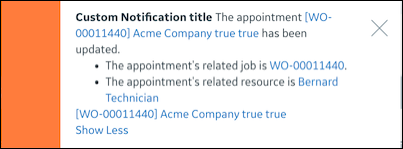
◦ To enable notifications, implement the following Groovy code to configure the custom operation to return notification content after execution:
String messageDetail = "The appointment [svmx_appointment](${appt.svmx_name} | ${appt.io_uuid}) has been updated."
List<String> messageDetailList = [
    "The appointment's related job is [svmx_job](${appt.svmx_related_to.svmx_name}).".toString(),
    "The appointment's related resource is [svmx_resource](${appt.svmx_assigned_to.svmx_name} | ${appt._svmx_assigned_to})".toString()
]
List<Map> records = [
    [name: appt.svmx_name, object: 'svmx_appointment', id: recordId]
]
// type supported options: information, warning, error
String type = 'warning'
Map notification = [type: type, title: 'Custom Notification title', messageDetail: messageDetail, messageDetailList: messageDetailList, records: records]
 |
Notifications support the Information, Warning, and Error types. Information notifications automatically dismiss after 7 seconds, and the other types must be manually closed. The type and title parameters are required, and you can configure the messageDetail, messageDetailList, and records parameters per your requirements.
|
◦ To enable an automatic refresh after custom operation execution, configure the custom operation to return refreshType values.
|
|
The refreshType option supports the record, calendar, and all options.
|
◦ To enable a custom validation and confirmation message, prepend the following code to your custom operation logic:
// make the operation support warning confirm dialog
if (isFailOnWarning) {
    Max.failOnValidationWarnings()
    // enable context for the validation error/warning message
    Max.putContextParameter(OperationValidator.ADD_CONTEXT_TO_VALIDATION, true)
}
|
|
• For details on how to create custom validation confirmation messages, see Configuring Custom Validation Confirmation Messages.
• If your custom URL includes isFailOnWarning=false, custom validation confirmation messages are always disabled, even when the code in the previous example is implemented.
|
3. Follow the steps in Configuring Action Menus to configure a custom menu option as follows:
◦ Set the Target field value of the control record as Custom Operation.
◦ Set the Client Code field value as the Route field value in the newly created Operation record.
◦ Add more parameters per your requirements.
Following are the refresh rules for custom menu items and refreshType values:
|
Object
|
Record
|
Calendar
|
All
|
|---|---|---|---|
|
Scheduler Job Card
|
Refresh the related Job.
|
Refresh the Scheduler Calendar.
|
Reload the current URL.
|
|
Map Job Card
|
Refresh the related Job.
|
No refresh action.
|
|
|
Crew Manager Resource Card
|
Refresh the Crew Calendar.
|
Refresh the Crew Calendar.
|
|
|
Crew Resource List
|
Refresh Crew Resources and select the Crew Resource List.
|
Refresh the Crew Calendar.
|
|
|
Scheduler Resource List
|
Refresh the Scheduler Calendar and select the Scheduler Resource List.
|
Refresh the Scheduler Calendar.
|
|
|
Map Resource Card
|
No refresh action.
|
No refresh action.
|
|
|
Scheduler Calendar Appointments
|
Refresh Events and Jobs for the related Resources. If Multiple-Resource Appointments or Crew Appointments are selected, refresh the SchedulerCalendar and the related Jobs.
|
Refresh the Scheduler Calendar.
|
|
|
Scheduler Calendar Multiple Appointments
|
Refresh Events and Jobs for the related Resources.If Multiple-Resource Appointments or Crew Appointments are selected, refresh the Scheduler Calendar and the related Jobs,
|
Refresh the Scheduler Calendar.
|
Example: Single Appointment Selection Custom Operation to Update One Appointment
package com.servicemax.dc.operation.scheduler

import com.servicemax.core.Database
import com.servicemax.core.Max
import com.servicemax.core.annotations.Application
import com.servicemax.core.validator.OperationValidator
import com.servicemax.dc.operation.DCOperation

@Application(application = 'svmx_dispatch_console')
class CustomMenuTestOperation extends DCOperation {

    @Override
    protected Object realExecute(Map<String, Object> parameters) throws Exception {
        String recordId = parameters.get('id')
        boolean isFailOnWarning = parameters.get('isFailOnWarning')?.toBoolean()

        // make the operation support warning confirm dialog
        if (isFailOnWarning) {
            Max.failOnValidationWarnings()
            // enable context for the validation error/warning message
            Max.putContextParameter(OperationValidator.ADD_CONTEXT_TO_VALIDATION, true)
        }

        // update appointment
        def appt = Database.getByUUID('svmx_appointment', UUID.fromString(recordId))
        appt.svmx_start_datetime = appt.svmx_start_datetime.plusSeconds(3600 * 2)
        appt.svmx_end_datetime = appt.svmx_end_datetime.plusSeconds(3600 * 2)
        Database.update(appt)

        def result = [:]

        // return pop-up notification content
        String messageDetail = "The appointment [svmx_appointment](${appt.svmx_name} | ${appt.io_uuid}) has been updated."
        List<String> messageDetailList = [
            "The appointment's related job is [svmx_job](${appt.svmx_related_to.svmx_name}).".toString(),
            "The appointment's related resource is [svmx_resource](${appt.svmx_assigned_to.svmx_name} | ${appt._svmx_assigned_to})".toString()
        ]
        List<Map> records = [
            [name: appt.svmx_name, object: 'svmx_appointment', id: recordId]
        ]
        // type supported options: information, warning, error
        String type = 'warning'
        Map notification = [type: type, title: 'Custom Notification title', messageDetail: messageDetail, messageDetailList: messageDetailList, records: records]
        result.notification = notification

        // supported refreshType: record, calendar, all
        result.refreshType = 'record'
        return result
    }
}
Example: Multiple-Appointment Selection Custom Operation to Update Appointment Status
package com.servicemax.dc.operation.scheduler

import com.servicemax.core.Database
import com.servicemax.core.Max
import com.servicemax.core.MaxObject
import com.servicemax.core.annotations.Application
import com.servicemax.core.validator.OperationValidator
import com.servicemax.dc.operation.DCOperation
import com.servicemax.workflow.WorkflowUtils

@Application(application = 'svmx_dispatch_console')
class MultipleSelectionCustomOperation extends DCOperation {

    @Override
    protected Object realExecute(Map<String, Object> parameters) throws Exception {
        List<String> recordIds = parameters.get('id').split(',')
        boolean isFailOnWarning = parameters.get('isFailOnWarning')?.toBoolean()
        // make the operation support warning confirm dialog
        if (isFailOnWarning) {
            Max.failOnValidationWarnings()
            Max.putContextParameter(OperationValidator.ADD_CONTEXT_TO_VALIDATION, true)
        }

        // update appointments status
        List<MaxObject> appointments = Database.query(
                'SELECT svmx_workflow, svmx_name FROM svmx_appointment WHERE io_uuid in :recordIds',
                [recordIds: recordIds])
        List<MaxObject> convertedAppts = []
        List<String> unConvertAppts = []
        appointments.each {
            String apptStatus = WorkflowUtils.getStateName(it.svmx_workflow)
            if (apptStatus == 'Pending') {
                WorkflowUtils.updateRecordStateByName(it, 'svmx_workflow', 'Accepted', false)
                convertedAppts << it
            } else {
                unConvertAppts << [name: it.svmx_name, object: 'svmx_appointment', id: it.io_uuid.toString(), status: apptStatus]
            }
        }

        Map notification = [:]
        if (unConvertAppts.size() > 0) {
            notification.title = 'The following appointments status convert failed.'
            notification.messageDetail = 'Check the following details:'
            notification.messageDetailList = unConvertAppts.collect{
                String detailItem = "[svmx_appointment](${it.name} | ${it.id})'s status is ${it.status}."
                return detailItem
            }
            notification.type = 'warning'
        } else {
            notification.title = 'All of the following appointments convert status successfully!'
            notification.records = appointments.collect{
                [name: it.svmx_name, object: 'svmx_appointment', id: it.io_uuid.toString()]
            }
            notification.type = 'information'
        }

        // show a pop-up notification on Service Board, and refresh the Calendar events
        return [notification: notification, refreshType: 'calendar']
    }
}
|
|
By default, you can select a maximum of 30 Appointments. To update this limit, you can configure the Maximum Appointment Selection Count setting.
|
When records are updated by custom operations, execution order for the custom operations and the event handlers bound to the update record operation is as follows:
1. The custom operation is executed.
2. The build is executed in non-batch mode by the Before event handler.
3. The build is executed in batch mode by the Before event handler.
4. The build is executed in non-batch mode by the custom Before event handler.
5. Changes are committed.
6. The build is executed in non-batch mode by the After event handler in a new transaction.
7. The build is executed in batch mode by the After event handler in a new transaction.
For more information: