Creating Dependency Management Groups
Schedule Optimization enables you to create dependency groups. You can specify the dependency between two or more work orders and other parameters for the dependency scheduling in the dependency groups. The optimizer supports the dependency between work orders and schedules the dependency work orders accordingly.
 |
You can create Dependency Management Groups only for Batch Optimization.
|
To create a dependency group:
1. Click the Dependency Management tab.
The Dependency Management Home page is displayed. It lists all the recent dependency groups in your Org. Click New to create a dependency group.
2. Click New to create a dependency group.
The New Dependency Management modal window is displayed, as shown in the following screenshot.
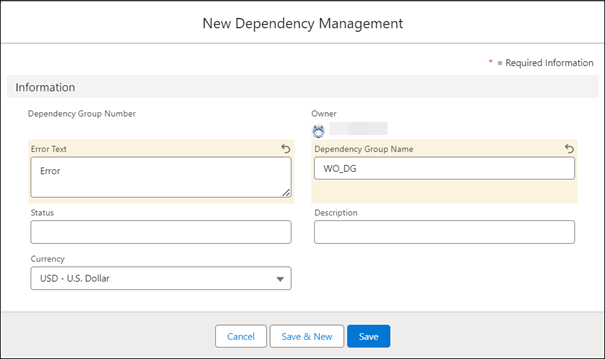
3. Specify the following information for the new dependency group:
|
Field
|
Description
|
|---|---|
|
Dependency Group Name
|
Specify a name for the dependency group you are creating.
|
|
Description
|
Specify a description for the dependency group.
|
|
Error Text
|
Enter an error text for the dependency group.
|
|
Status
|
Enter a status.
|
|
Currency
|
Select a currency from the dropdown list.
|
4. Click Save.
5. Click the Related tab of the newly created dependency group.
6. Click New in the Work Order Dependency to add work order dependencies.
7. Create work order dependencies in the tabular grid in the Lines section by specifying the required information for each dependency group. You can either enter information in each column or click the table icon adjacent to the row and enter information in the pop-up window.
|
|
To define the dependency management group, the Primary Work Order, Secondary Work Order, Time Dependency, and Resource Dependency fields are mandatory.
|
|
Field
|
Description
|
||
|---|---|---|---|
|
Fields marked with * are mandatory.
|
|||
|
Primary Work Order*
|
Specify the work order that is primary in the dependency group you are creating. You can use the lookup option to select the work order.
|
||
|
Secondary Work Order*
|
Specify the secondary work order for the dependency group. You can use the look-up option to select the work order.
|
||
|
Time Dependency*
|
Specify the time dependency you want to enforce between primary and secondary work orders. The following are the time dependency options:
• None: Select this option if you want to create the dependency group only to define a resource dependency.
• Start to Finish: Primary work order must start before secondary work order can finish: Select this option if you want the secondary work order to finish only after the primary work order has started.
• Start to Start: Primary work order must start before secondary work order can start: Select this option if you want the secondary work order to start only after the primary work order has started.
• Finish to Finish: Primary work order must finish before secondary work order can finish: Select this option if you want the secondary work order to finish only after the primary work order has finished.
• Finish to Start: Primary work order must finish before secondary work order can start: Select this option if you want the secondary work order to start only after the primary work order has finished.
• Finish in Unison: Both work orders must finish simultaneously: Select this option if you want both the primary work order and the secondary work order to finish at the same time.
• Start in Unison: Both work orders must start simultaneously: Select this option if you want both the primary work order and the secondary work order to start at the same time.
• Set Arrival Time of Secondary relative to the End Time of Primary: Select this option if you want to set the arrival time for the secondary work order relative to the arrival time of the primary work order.
|
||
|
Resource Dependency*
|
Specify the resource dependency you want to enforce between primary and secondary work orders.
The following are the resource dependency options:
• None: Select this option if you are using this dependency group to create a time dependency, and do not want to specify any resource dependency. However, you can use a dependency group to specify both time and resource dependencies at the same time.
• Same Resource: Select this option if you want the optimizer to assign both the primary work order and the secondary work order to the same technician.
• Different Resource: Select this option if you want the optimizer to assign the primary work order and the secondary work order to two different technicians.
|
||
|
Minimum Time Buffer
|
If you are creating a time dependency group, specify the minimum time buffer from which the time dependency needs to be met.
|
||
|
Minimum Time Buffer Units
|
Select the unit for the minimum time buffer. Available options are minutes, hours, and days.
|
||
|
Maximum Time Buffer
|
If you are creating a time dependency group, specify the maximum time buffer up to which the time dependency needs to be met.
|
||
|
Maximum Time Buffer Units
|
Select the unit for the maximum time buffer. Available options are minutes, hours, and days.
|
||
|
|
If you have selected Finish in Unison or Start in Unison as the time dependency, the time buffers are considered.
|
8. Click Save to save the work order dependency you have created.
The saved dependency is displayed in the Related tab.
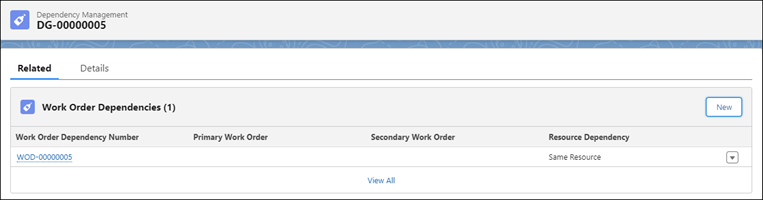
9. Click the New to add more work order dependencies to the dependency group.
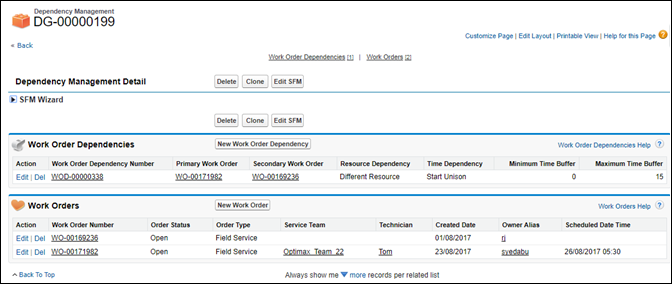
When you create and save a dependency group, all the associated work orders are updated with the dependency group number. The Dependency Group field in the associated work orders is updated, as shown in the following screenshot.
|
|
• When scheduling the dependency work orders, the optimizer supports the dependencies and schedules them accordingly.
• Dependency is a soft constraint.
|