Viewing and Updating Technical Attributes Using OOB Custom Action URL
An SFM Custom Action of Type URL - Technical Attributes, is available out-of-the-box for the Installed Products object. Using this SFM Custom Action on an Installed Product, you can invoke the Technical Attributes template for an installed product. For more information about how to configure an SFM Custom Action, see SFM Custom Actions.
When the Technical Attributes SFM Custom Action is invoked for an Installed Product, the Technical Attributes template is displayed in a modal window as shown in the following screenshot:
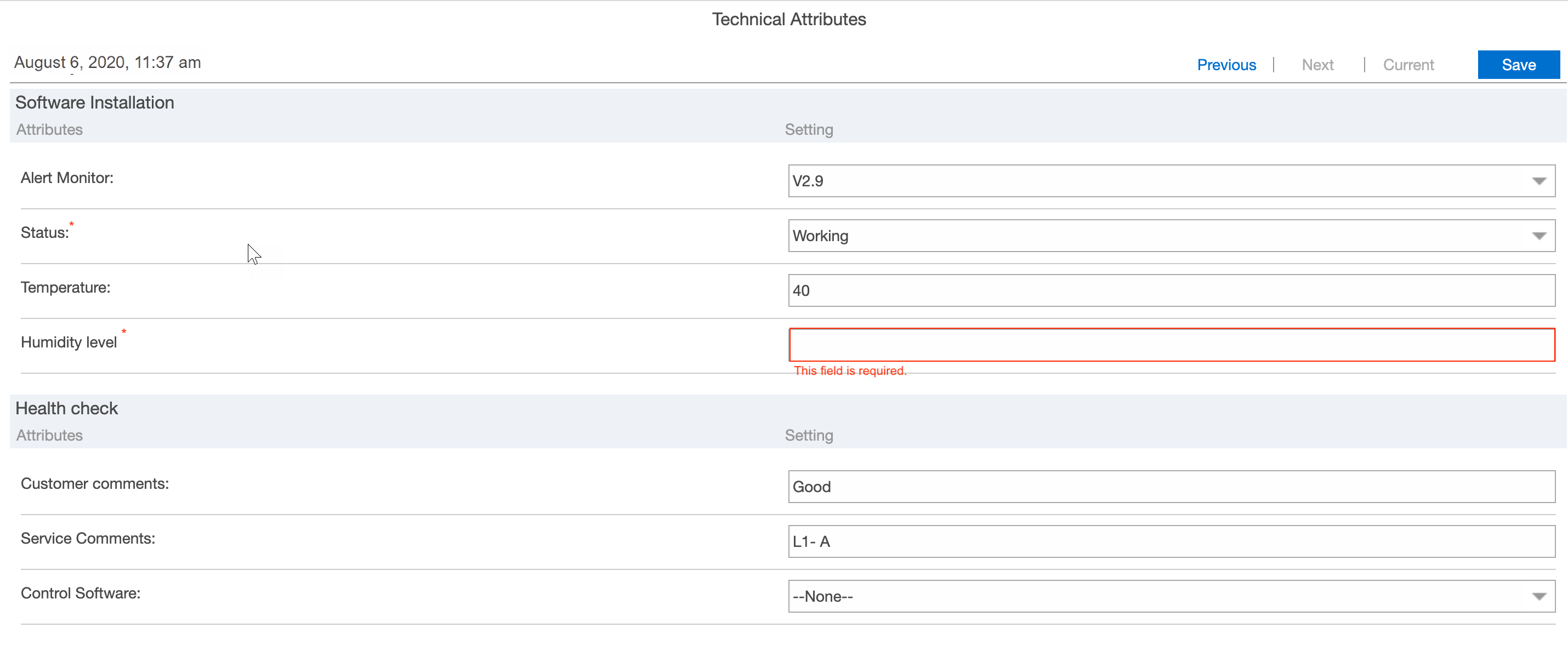
In this modal window, you can view all the attributes for the Installed Product and update attribute values.
The following are the fields of the Technical Attributes Template modal window:
|
Fields
|
Description
|
|---|---|
|
Date and Time
|
This displayed in the Detail tab is the date and time on which the attributes were last saved
|
|
Format Types
|
Boolean: Displayed as checkboxes in the modal window.
Picklist: Displays values in a drop-down list in the modal window. Also, the Picklist type of attributes fetches the latest list of values from the picklist definition at run time.
|
|
Current Link
|
Displays the latest values recorded for the attributes of the selected installed product
|
|
Previous link
|
Displays the last set of attribute values that were recorded for the selected installed product
|
|
Next Link
|
Displays the next set of attribute values recorded after the previous set for the selected installed product
|
|
Save
|
Click Save to save all the changes made to the attributes' values and close the modal window.
|
|
Close button (X)
|
To close the modal window. If there are any unsaved changes, then those changes will be lost when you close the modal window.
|
|
Mandatory attributes
|
All the mandatory attributes have the * icon and you cannot save remove or close the technical attribute record without entering values in those fields. If the mandatory fields are empty on save, then you will get an inline error message below the field: 'This field is required'.
|
When no matching Technical Attributes Template is found for the selected installed product, the following error message is displayed:
No technical attributes are associated with this installed product.
Following are the key features and behavior of the Attribute Template modal window:
• Decimal values are rounded to the third decimal value when viewed in the modal window.
• Attributes can be edited only if they are not set as read-only.
• You can dynamically resize the modal window. Expand the modal window to view the hidden fields and adjust the field area length automatically.
• When attribute values are updated for the first time on a given day, the existing attribute values are preserved and displayed as previous values. Any further updates to the attribute values during the same day are overwritten and displayed as previous values. Therefore, this previous link always displays the last set of attribute values added the previous day.
• The Previous link and Next link are disabled until the attribute values are updated for the first time (on a different day from when initial values were recorded) and saved in the Installed Base App.
• Any change to the attribute value saved is maintained in the attribute history. Previous and Next on the technical attribute delivery UI displays the latest entry captured for that day. To view attribute history for every save performed, see Technical Attributes History View.
 |
On the web delivery, Attributes are displayed in the logged-in user's language if the admin has enabled translations.
|
Reference Topics