Viewing the List View Tab
The List View tab lists the time-tracking records in a tabular format with details. You can create new time-tracking records using the New button at the top of the list view page. You can also perform edit, clone, delete, and run now actions on each row of the time-tracking records.
To view the Time Tracking list view:
Go to ServiceMax Setup > Installed Base, Preventive Maintenance and Field Change Orders > Time Tracking. The Time Tracking list view is displayed.
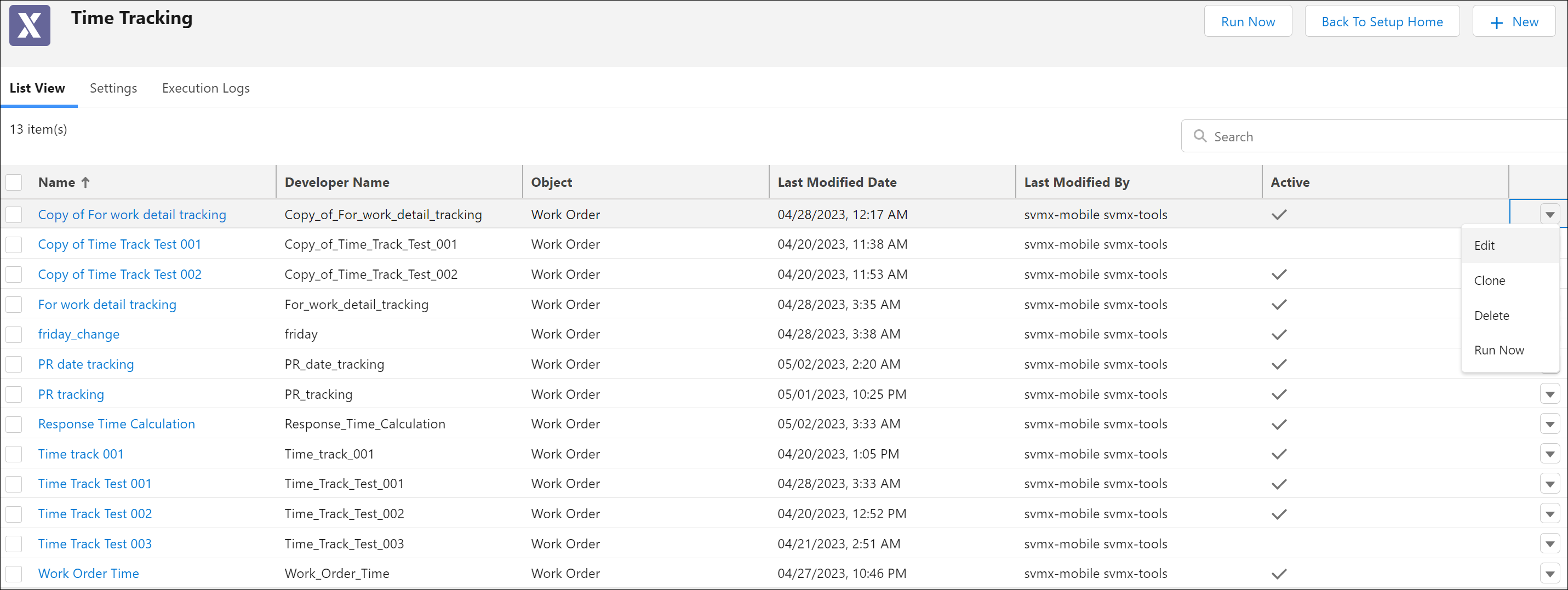
The following information is displayed on the Time Tracking list view page.
|
Fields
|
Description
|
|---|---|
|
Name
|
Name of the Time Tracking configuration.
|
|
Developer Name
|
Unique ID of the Time Tracking configuration.
|
|
Object
|
The object on which the Time Tracking is configured.
|
|
Last Modified Date
|
The date when the Time Tracking configuration was last modified.
|
|
Last Modified By
|
The user who last modified the Time Tracking configuration.
|
|
Active
|
The flag to determine whether the Time Tracking configuration is active or inactive.
|
 |
• The default sorting of the list view is as per the last modified date.
• The total no of Time Tracking records listed on the list view page is 500.
|
Menu Options on the List View Tab
The following menu options are available on the Time Tracking list view page.
|
Fields
|
Description
|
|---|---|
|
Click New at the top of the list view page to create a new time-tracking configuration.
|
|
|
Click the drop-down menu at the end of each time tracking record row and click Edit to edit the time-tracking configuration.
|
|
|
The object on which the Time Tracking is configured.
|
|
|
The date when the Time Tracking configuration was last modified.
|
|
|
The user who last modified the Time Tracking configuration.
|