Creating a Custom Action
To create a custom action
1. Go to ServiceMax Setup > Service Flow Manager > Custom Actions.
2. Select the object for which you want to create a custom action.
◦ Predefined custom actions of ServiceMax for the selected object are listed under the Pre-configured Custom Actions section.
 |
Pre-configured custom actions cannot be modified, but you can clone them to create User-defined Custom Actions.
|
◦ User-defined custom actions are listed under the User-defined Custom Actions section.
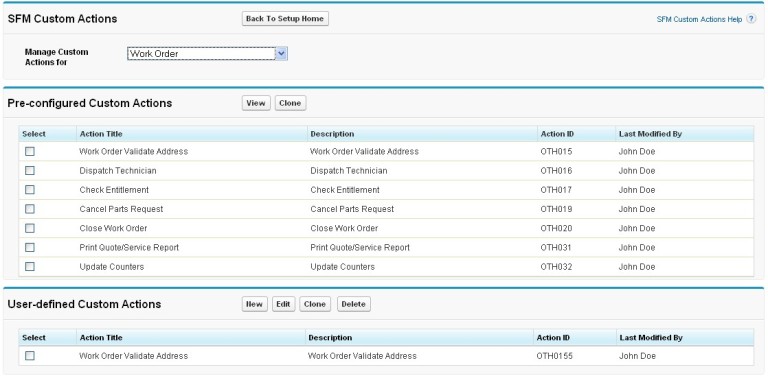
3. Click New in the User-defined Custom Actions section.
4. Select an option from the Action Type drop-down list. The options are:
a. URL
b. Email
c. Web-service
d. App-to-App
f. UI-Component
5. Provide the following details based on the type of custom action selected.
|
Fields
|
Description
|
|---|---|
|
Object
|
Name of the Object. For example, Installed product, Case.
|
|
Action Title
|
Name of the Action.
|
|
Action ID
|
Unique identification of the Action.
|
|
Description
|
A detailed description of the SFM Custom Action.
Details entered here are displayed in the Manage Actions screen, when the action is selected.
|
|
Open URL in
|
Launch the Action in New Window or Existing window.
|
|
Open URL to Launch
|
The URL to launch the Action.
|
|
Window Height
|
The Height of the new window to be launched for the
Action.
|
|
Window Width
|
The Width of the new window to be launched for the
Action.
|
|
Open As Full Window
|
A checkbox that indicates action will be launched in the full window.
|
|
Is Active
|
A checkbox that indicates if the Action is currently active and available for use.
|
|
Show Scrollbars
|
A checkbox that indicates scrollbars enabled when launching a new window
|
|
Parameter Name
|
Name of the parameter for the Action.
|
|
Parameter Value Type
|
Select Field Name or Value as the Parameter Value type for the Action.
|
|
Parameter Value
|
If the Value Type is Field Name, then the Parameter value will be a map of fields in the object else the default
value to be used for that field.
|
6. Click Save & Close.