Layout Editor
Layout Editor is a form designer where the admin designs the form by using the objects selected in the Objects and Mapping tab. A page layout is a reusable, standalone entity associated with a specific set of target objects and shared across SFM transactions. Layout Editor designs the SFM Delivery screen UI.
Launching Layout Editor
Navigate to Home > ServiceMax Setup > Service Flow Manager > Transaction Designer > Transaction List > Edit Transaction > Layout Editor tab.
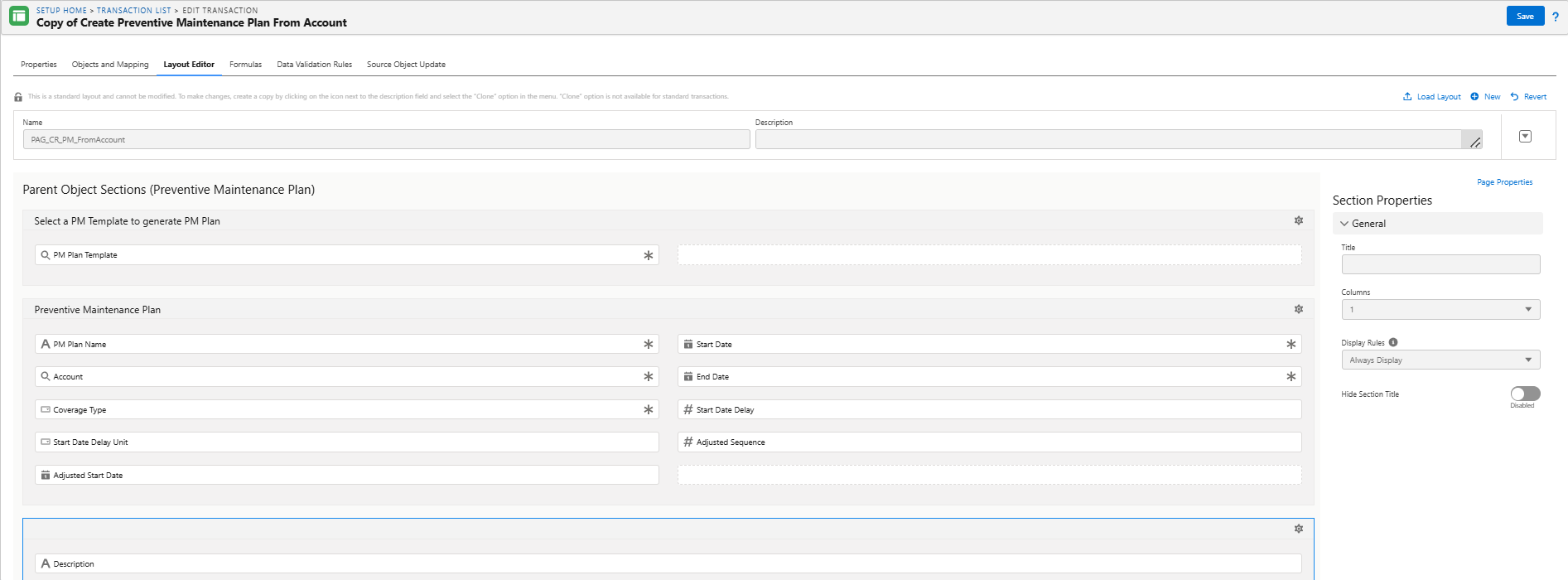
The Layout Editor is divided into four parts:
The Layout Editor tab is organized as follows:
|
UI Components
|
Description
|
|---|---|
|
Action Icons
|
The Action Icons area at the top of the page includes the Page Layout selection picklist, Name, and Id fields, and the Save, Save As, New, Reset, and Delete icons.
|
|
Buttons
|
The Buttons area includes the standard buttons Save and Cancel, any custom buttons configured, and the Add icon to add custom buttons.
|
|
Header Sections
|
The Header Section(s) area has one or more sections in which target header object fields are configured.
|
|
Child Sections
|
The Child Section(s) area at the bottom has one section per target child, in which target child object fields are configured.
|
|
Properties
|
The Properties pane on the right side dynamically changes based on the component in focus.
|
 |
• There is a difference in the behavior of fields when fields are deleted and re-added on the Page Layout between Classic and new HTML5 Designer behavior.
• When a field is removed from the layout, the additional attributes configured in the layout for the field are lost. If the same field is added back to the layout, it is a fresh addition. This is expected behavior for lookup fields and all other types of fields.
|