Installed Product Configuration
The Installed Product configuration shows the tree view of all Installed Products in a hierarchy from the top-most product. Your admin might have enabled this view either in the embedded mode or popup mode or both. In the embedded mode, the tree view is displayed from all Installed Product records as shown in the following screenshot.
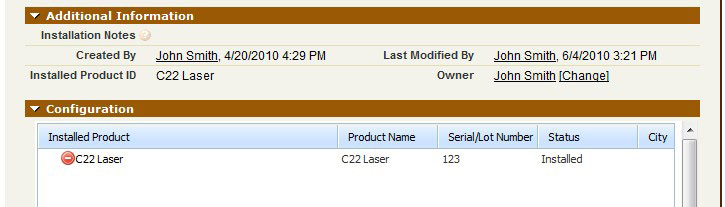
To view Installed Product configuration as a popup window:
1. Click Configuration in the Installed Product screen. You can also click any node in the tree to open the Installed Product in a new window. The following screenshot is a sample Installed Product configuration tree in popup mode.
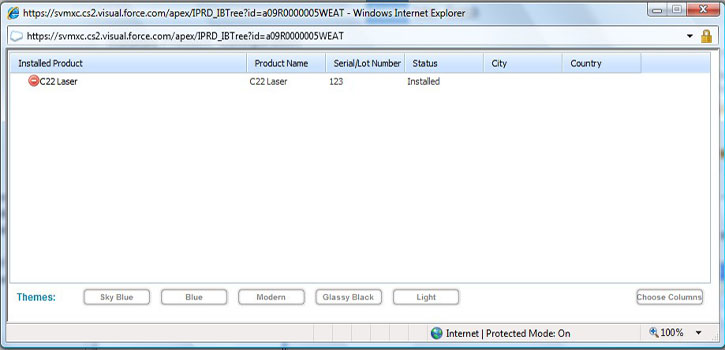
2. You can configure the columns displayed in the Installed Product tree by clicking Select Columns. A popup screen is displayed as shown in the following screenshot.
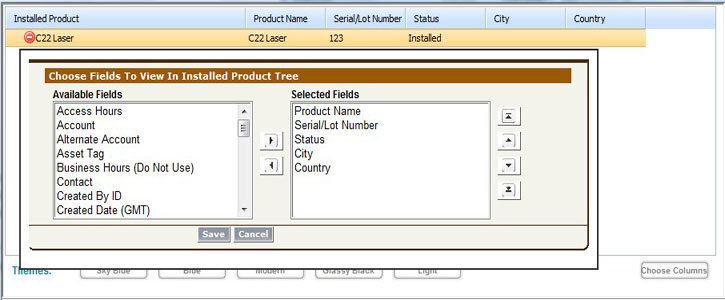
The list of all available fields in Installed Product appears on the left. Fields currently in the view appear on the right.
3. Click Save. The Installed Product tree view will be refreshed with the columns you have selected.
The following table lists the various operations you can perform on the Configuration Tree Popup screen.
|
Action
|
Result
|
|---|---|
|
Click field name.
|
Field name is selected.
|
|
CTRL+Click field name.
|
Multiple fields are selected.
|
|
Click
 |
Fields selected from the left-side are moved to the right-side.
|
|
Click
 |
Fields selected from the right-side are moved to the left-side.
|
|
Click
 |
The selected fields are moved to the top of the list.
|
|
Click
 |
The selected fields are moved to the bottom of the list.
|
|
Click
 |
The selected fields are moved one position up.
|
|
Click
 |
The selected fields are moved one position down.
|
 |
The columns you have selected are saved locally on your browser using cookies. Clearing your browser’s cache will reset the installed product tree to use default columns. This screen is presented by the Service Flow delivery engine of ServiceMax based on the service flow configuration. To learn more about how to use this screen’s features, see SFM Delivery. In addition, you can click the screen title or the help button to view additional help for this screen, if configured by your admin.
|