Event Modal Window
The Event Modal window allows you to map the source object fields to the IB Time Card fields to calculate the time difference of the event between the Start DateTime and End DateTime. You can map the following items:
• Select the From and To Datetime field on the source object that indicates the start and end of an event.
• Select the fields on IB Time Card to map the source object fields and a field to hold the Time difference.
The following screen displays the Event Modal window.
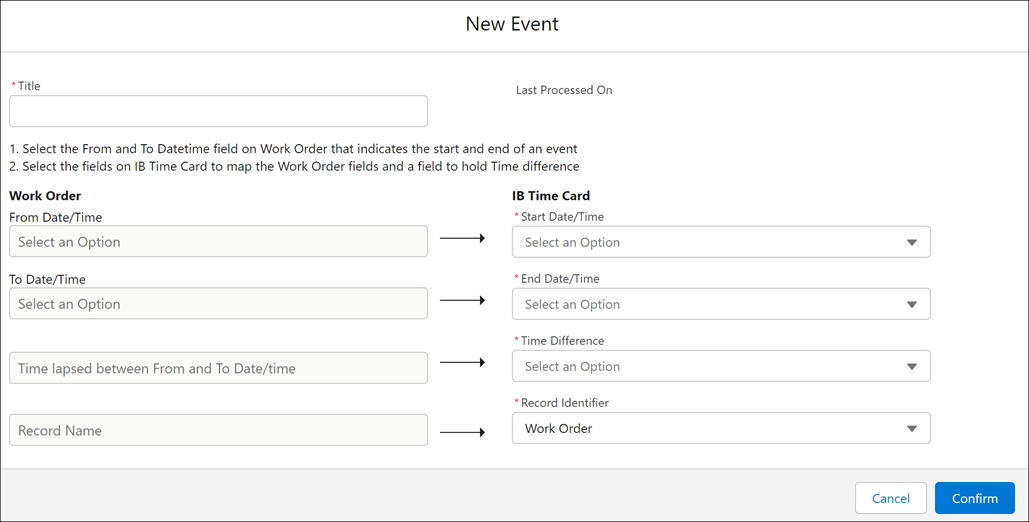
The following table lists the field details for the Event Modal window.
|
Fields
|
Description
|
|---|---|
|
*Title
|
Enter a title for the IB Time Card mapping.
|
|
Last Processed On
|
Auto-populates the DateTime when the Event was last executed.
|
|
From Date/Time
|
Click and select a From DateTime field from the drop-down list. For example, Inspection Start DateTime. This field supports Multi-level field mapping.
|
|
*Start Date/Time
|
Select a Start DateTime field from the drop-down list.
|
|
To Date/Time
|
Click and select a To DateTime field from the drop-down list. For example, Inspection End DateTime. This field supports Multi-level field mapping.
|
|
*End Date/Time
|
Select an End DateTime field from the drop-down list.
|
|
Time lapsed between From and To Date/time
|
This is the label for the Time Difference field.
|
|
*Time Difference
|
Select a field to hold the time difference value.
|
|
Record Name
|
This is the label for the Record Identifier field.
|
|
*Record Identifier
|
Select a field as the Event record identifier.
This field is a lookup to the source object. The execution fails if there is a mismatch in the object type.
|