Edit a Configuration Setting Value
This section covers the procedure for editing the value of a configuration setting. If you need to identify the settings applicable for a particular feature or app, see section Finding Relevant Settings for a Feature.
 |
You can edit the values of global settings only for a custom org-wide profile (choose the active profile). However, you can edit the values of group settings for both custom group-wide profiles and custom org-wide profiles.
|
As described in the section How is the setting value determined for a ServiceMax user, if the ServiceMax user’s profile is associated with a group profile, group setting values defined for the group-wide profile are considered. Else, group setting values defined for the active org-wide profile are considered.
1. Select the checkbox adjacent to the custom org-wide or group-wide profile for which you want to edit the values of configuration settings, and click Edit.
|
|
If you select the standard org-wide or group profile and click Edit, you can only view the (default) values of configuration settings.
|
Select a module from the Select Module picklist and then select a submodule. All configurable settings applicable to the selected submodule are displayed.
1. If you select an org-wide profile, all the configuration settings are displayed.
2. If you select a group-wide profile, only configuration settings of type Group are displayed.
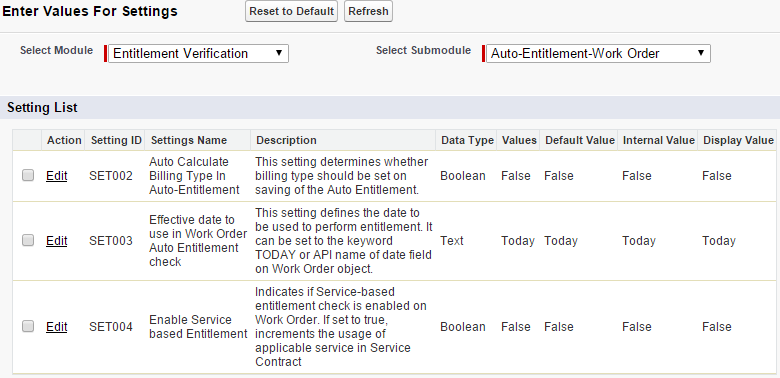
3. Click the Edit link to edit the setting value. A popup window as shown below appears. Depending upon the setting’s data type, this screen will automatically capture the appropriate value. For example, if the setting data type is Boolean, this screen will show an option to select True or False.
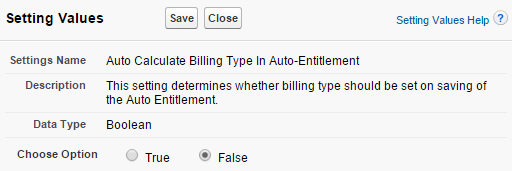
4. Update the setting value and click Save.
5. Repeat the previous two steps for each required setting in any selected submodule.
6. Click the Refresh button to see the updated values in the configuration setting list screen.
7. If you need to reset the values of any settings to their default values, check the checkbox adjacent to the required settings and click Reset to Default.