Creating a Task Template
To create a task template:
1. Go to ServiceMax Setup > Installed Base, Preventive Maintenance & Field Change Orders> Task Templates. The Task Templates list view is displayed.
2. Click New. The New Task Template pop-up window is displayed.
3. Select the Templates record type. The Create Work Template page is displayed.
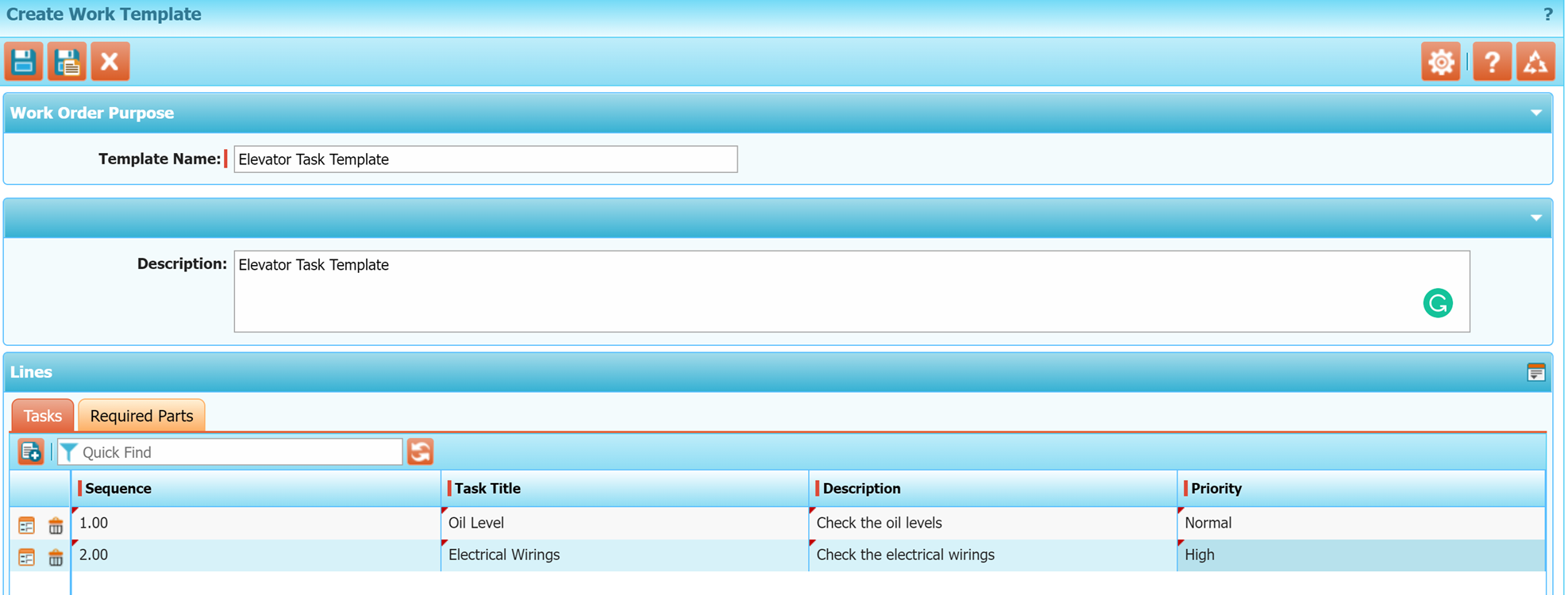
4. Enter the details for the following fields:
|
Field
|
Description
|
|---|---|
|
Template Name
|
Enter the name of the template. For example, the Installation Checklist for HP9000 Series Servers.
|
|
Description
|
Enter the detailed description of the template.
|
|
Tasks Tab
|
|
|
Sequence
|
Enter the sequence of the task to be carried out.
|
|
Task Title
|
Enter a summary of the task to be performed.
|
|
Description
|
Enter the detailed description of the task to be performed.
|
|
Priority
|
Select the priority of the task from the drop-down list. Uses the same priority values of Salesforce tasks such as Normal, Low, and High.
|
|
Required Parts Tab
|
|
|
Product
|
Select a product required as part of the maintenance.
|
|
Quantity
|
Enter the quantity of the products required.
|
5. Click Save to save the template.
You can also perform the following actions:
• To delete a task, click the Delete icon for the corresponding task.
• To edit a row, double-click each field and add the details.
• To add more required parts, click the Add a row icon. Alternatively, you can click the Extended edit icon to add all the fields in a row at the same time and click Update.
• To Search for required parts and add them, use the Search and Add icon to search .
 |
While creating the template, ensure that you select the Template Type as Preventive Maintenance to make it appear in PM SFMs.
|