Viewing the FCO Search Results in 24.1
The FCO Search Results screen displays the various FCO Line records in a tabular format after running the FCO Search defined in the Define Search screen.
The following FCO search results screen is shown:
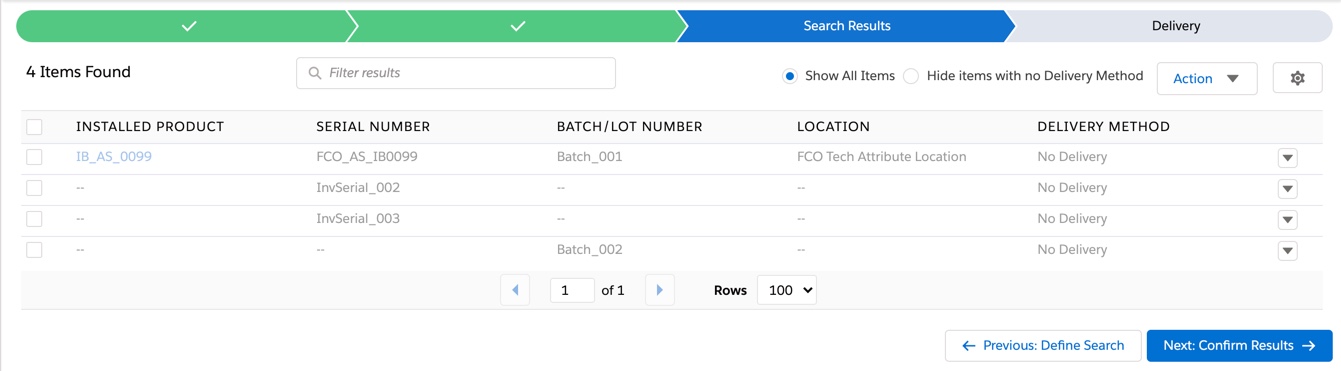
The following default fields are shown as columns in the FCO Search Result List screen:
|
Field
|
Description
|
|---|---|
|
Installed Product
|
The name of the associated Installed Product.
|
|
Delivery Method
|
The type of delivery method record that will be generated for the FCO Result Line.
|
|
Serial Number
|
The serial number associated with the installed product or Product Stock Item.
|
|
Batch/Lot Number
|
The batch number associated with the installed product or Product Stock Item.
|
|
Location
|
The location of the Installed Product or Product Stock Item.
|
The FCO Search results screen allows you to perform the following actions:
• Filter Results: This allows you to filter the search based on the values in the table columns by specifying a keyword in the Filter Results field.
• Sort by Column: This allows you to sort the result list data based on a column. Click the table column if you would like to sort by columns.
• Actions: This allows you to update the Delivery Method for the selected items and manually add installed products to the results list. For more information on the actions, see Adding the Installed Products Manually and Updating the Delivery Method.
• Previous: Define Search: This allows you to return to the Define Search screen.
 |
• When an FCO Search process has run and created the FCO Result lines displayed in the Search Results Table, returning to the Define Search screen will display your search expressions in Read-Only mode. If you wish to make edits to your Search Expression in the "Define Search" Screen, you will need to select the "Edit Search" button from the upper right-hand corner of the search screen.
• Click the "Edit Search" button to edit the FCO Search expressions. It will assume that you wish to re-run your FCO Search, which will delete your existing FCO Search Results (including any manually added installed products in the results list) and replace them with the results of your newly edited FCO Search expressions.
|
• Show All Items: This allows you to view all the FCO line items.
• Hide Items with No Delivery Method: This allows you to hide the FCO items with the Delivery Method option of No Delivery selected.
Apex Script to Update the FCO Delivery Method on the FCO lines
When you upgrade the ServiceMax package from a previous package to the 23.1, 23.2 or 24.1 release and have FCO lines in your org, you will receive an email notification with the subject line "ServiceMax Release Upgrade: FCO Post-Installation Script Required." Customers who receive the email notification must run an Apex script to update the FCO delivery method on the FCO lines. For more information, see Upgrade Considerations for Field Change Order.